
MiniMax released MiniMax H3 Image in November 2026, pitched at realistic photos, posters with text and up to 16 reference images. Launch posts always sound great. What you actually want to know is how it compares with the models you already use, GPT Image 2.6 and Nano Banana: where it wins and where it falls short.
All of these models are in the Image2 generator, and switching models doesn't change your prompt. So we ran one simple test: the same 12 prompts, word for word, through 4 models, once each, with identical settings and no rerolls. The first 8 prompts come from our earlier 5-model comparison. The last 4 are new and aimed at what MiniMax advertises: multi-reference composites, a photoreal close-up portrait, a Chinese e-commerce image and an English movie poster.
The short answer
| If you need… | Use | Why |
|---|---|---|
| Posters or product images with Chinese text | GPT Image 2.6 or MiniMax H3 | Both got every character right in two Chinese tests; Nano Banana Pro didn't |
| The fastest results | MiniMax H3 | About 23 seconds on average, the fastest of the four, 4 credits at 1K |
| A specific person and product in one shot | GPT Image 2.6 | Kept the face closest to the reference in the two-image test |
| Editing your own product photo | GPT Image 2.6, MiniMax H3, NB Pro | All kept the bottle and label; Nano Banana 2.1 reshaped it |
| Light, true watercolor illustration | Nano Banana 2.1 | Right look and right composition; MiniMax looked most like watercolor but left the hedgehog out in the rain |
| Photoreal portraits and skin texture | Any of the four | All four fisherman portraits looked real; pick the light you like |
In one line: with its default settings, MiniMax H3 Image is a real rival to GPT Image 2.6. Same price, equally accurate text, and a bit faster. Where it falls behind is keeping the same person across a multi-image composite. One trap to avoid: don't switch off the prompt enhancer without a reason. With it off, MiniMax made noticeably more mistakes (details below).
The 4 models
| Model | Made by | Credits (1K) | Avg. time (12 tests) | Max reference images |
|---|---|---|---|---|
| GPT Image 2.6 Sunburst | OpenAI | 4 | 26 s | 16 |
| Nano Banana 2.1 | Google (Gemini) | 4 | 38 s | 14 |
| Nano Banana Pro | Google (Gemini 3 Pro Image) | 5 | 48 s | 14 |
| MiniMax H3 Image | MiniMax | 4 | 23 s | 16 |
Prices are for text-to-image. MiniMax H3 also has a Highspeed version. Its images look close to the standard model, but it costs 8 credits at 1K and was only 3 to 4 seconds faster in our runs, so it isn't compared separately here. See MiniMax H3 Image review and tips for those details.
How we tested
- Identical prompts for all 4 models, word for word;
- Identical settings: 1:1 at 1K. GPT Image 2.6 used the standard quality tier; Nano Banana and MiniMax have no quality tiers;
- MiniMax on default settings, which means the prompt enhancer is on. That is the generator's default and what most people use. For edits and multi-reference prompts, MiniMax always turns the enhancer on;
- First result only: no rerolls and no per-model prompt tweaks;
- For the first 8 tests, the GPT and Nano Banana images come from our November 12 comparison. MiniMax and the 4 new tests ran on November 13. Times include a few seconds of polling and download, so treat them as relative.
Each model ran each prompt once, so treat the results as tendencies, not guarantees. In every comparison image, GPT Image 2.6 is top left, Nano Banana 2.1 top right, Nano Banana Pro bottom left and MiniMax H3 Image bottom right.
Test 1: English text on a chalkboard menu
A hand-lettered café chalkboard titled "Today's Brews", with four drinks, four prices and a coffee cup doodle:
A chalkboard menu hanging in a cozy café, hand-lettered in white chalk. Title: "Today's Brews". Items with prices: "Flat White $4.50", "Oat Latte $5.00", "Cold Brew $4.00", "Chai Tea $3.75". Small chalk doodle of a coffee cup in the corner. Warm morning light.
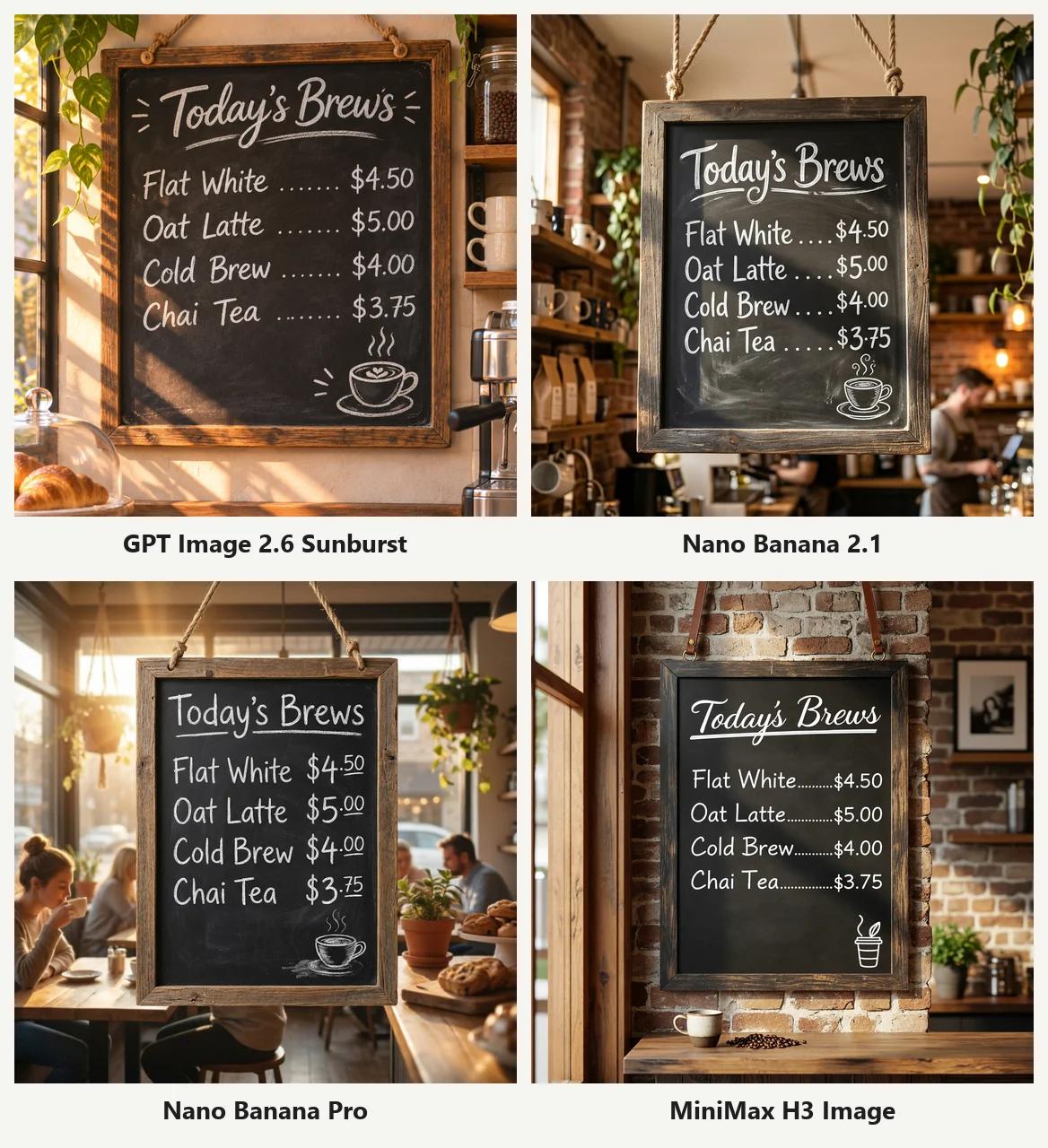
All 4 models got it right. MiniMax hung its board on a brick wall, with dotted leaders between items and prices and a script title, as tidy as GPT Image 2.6.
Worth knowing: we also ran this prompt on MiniMax with the prompt enhancer off, and it wrote "Flat Whitte". With the enhancer on, the typo was gone.
Test 2: Chinese text on a tea poster
A Chinese tea poster with a vertical calligraphy title (一盏秋茶), two lines of small text with a date and an offer, and a red seal reading 茶:
一张竖版风格的新中式茶饮海报,米白色宣纸质感背景,左侧一杯冒着热气的青瓷盖碗茶,旁边几片茶叶。右侧竖排大标题书法字「一盏秋茶」。下方横排小字:「桂花乌龙 · 限时上新」和「11月15日 起 · 第二杯半价」。整体留白充足,配色为米白、墨黑和一点朱红印章,印章上写「茶」。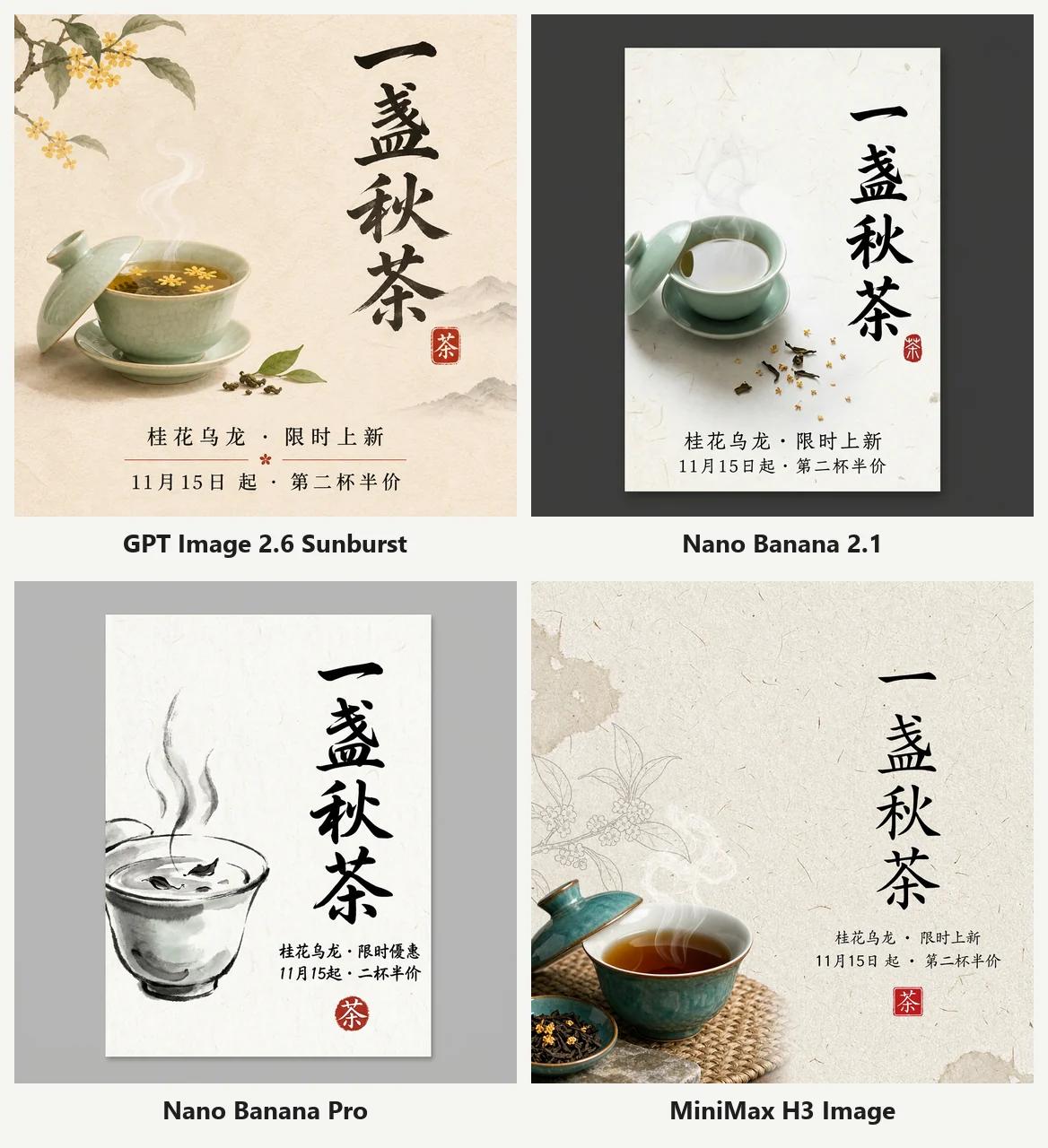
- GPT Image 2.6 and MiniMax H3: title, both small lines and the seal are all correct. MiniMax drew a celadon gaiwan with a dish of tea leaves and faint line-drawn branches in the background;
- Nano Banana 2.1: text all correct, but it drew the poster as a print on a dark backdrop;
- Nano Banana Pro: 3 errors in the small text, including a changed word in traditional characters and two dropped characters.
For Chinese posters, both GPT Image 2.6 and MiniMax H3 are safe picks.
Test 3: Product photo
A frosted perfume bottle with a gold cap on wet black stone, soft light from the left, water droplets on the glass:
Studio product photo of a frosted glass perfume bottle with a gold cap, standing on a slab of wet black stone. Soft key light from the left, subtle reflection on the stone, a few water droplets on the bottle. Dark gradient background. Shot on a 100mm macro lens.
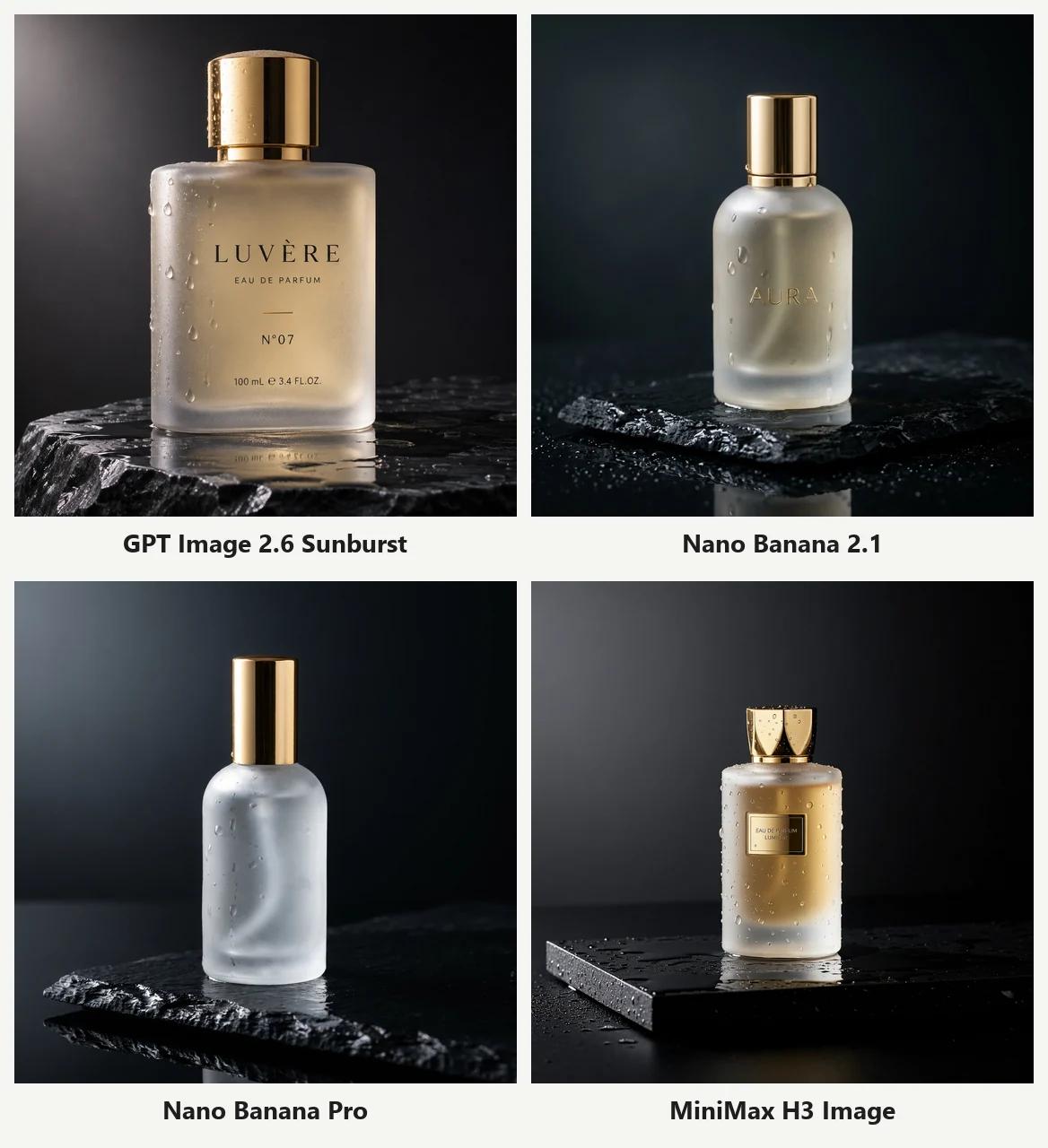
All four look like studio shots. The difference is the label:
- GPT Image 2.6 invented "LUVÈRE N°07". MiniMax H3 added a gold plaque reading "EAU DE PARFUM / LUMIERE" and gave the bottle a crown-shaped cap;
- Nano Banana 2.1 embossed "AURA". Only Nano Banana Pro left the bottle blank.
If you plan to add your own logo, put "no text or logo on the bottle" in the prompt. MiniMax with the enhancer off did worse here: its label was unreadable gibberish.
Test 4: A person with hands
A woman in her 30s laughing at a café table, holding a ceramic cup with both hands, in a mustard sweater:
Candid photo of a woman in her 30s laughing at a café table, holding a ceramic coffee cup with both hands. Natural window light, shallow depth of field, slight film grain. Wearing a mustard knit sweater.
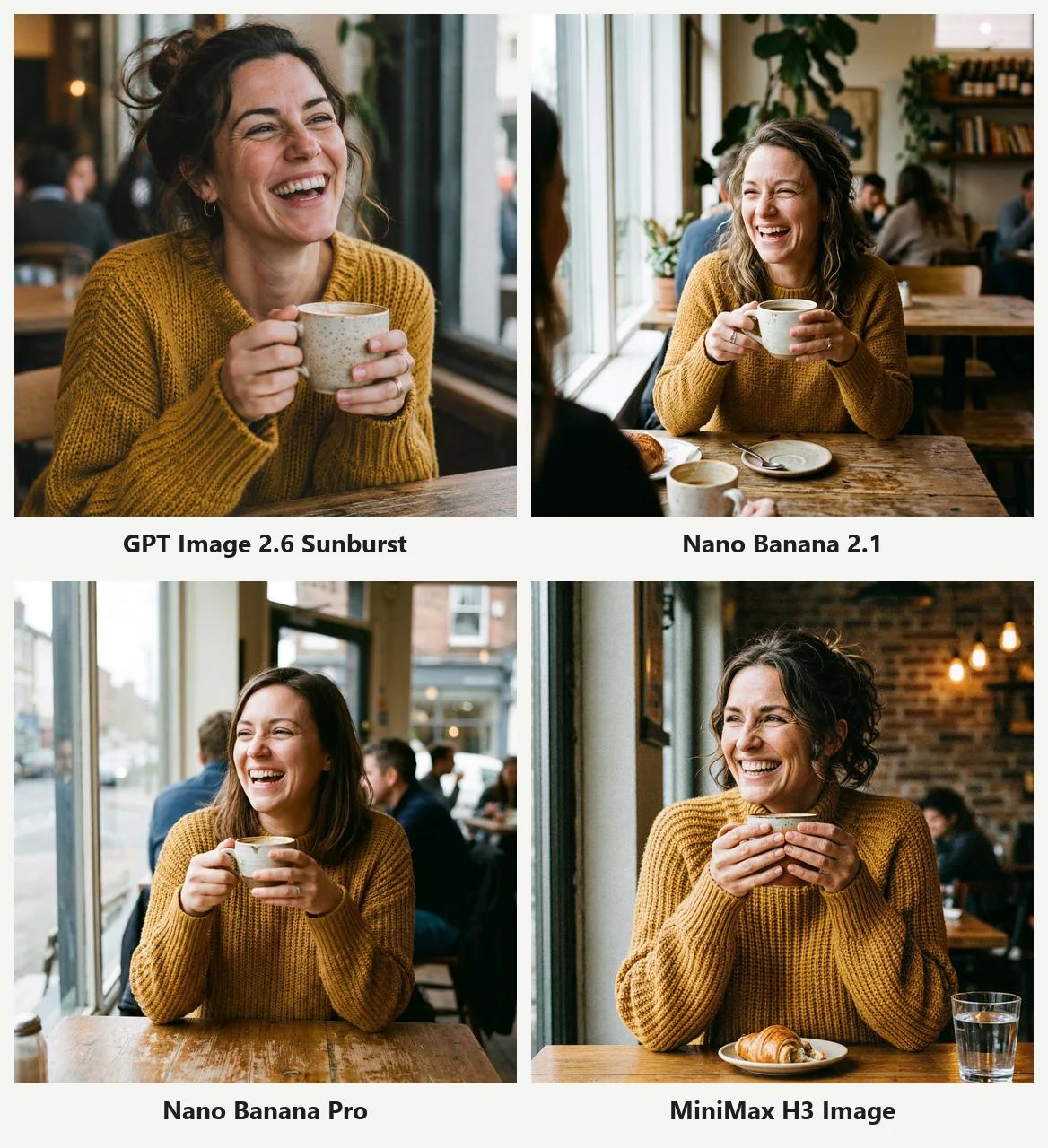
No broken hands anywhere. MiniMax framed it between the two camps: she fills about half the frame, with a croissant and a glass of water on the table and a warm brick café behind her. Natural and well finished.
Test 5: Infographic
A flat infographic titled "How Coffee Gets to Your Cup" with four numbered steps, icons and captions:
A clean flat-design infographic titled "How Coffee Gets to Your Cup", showing 4 numbered steps left to right with simple icons: 1 "Harvest", 2 "Dry", 3 "Roast", 4 "Brew". Under each step a short caption: "Pick ripe cherries", "Sun-dry for 2 weeks", "Roast at 200°C", "Brew at 92°C". Thin arrows between steps. Cream background, brown and orange color palette. Lots of white space.
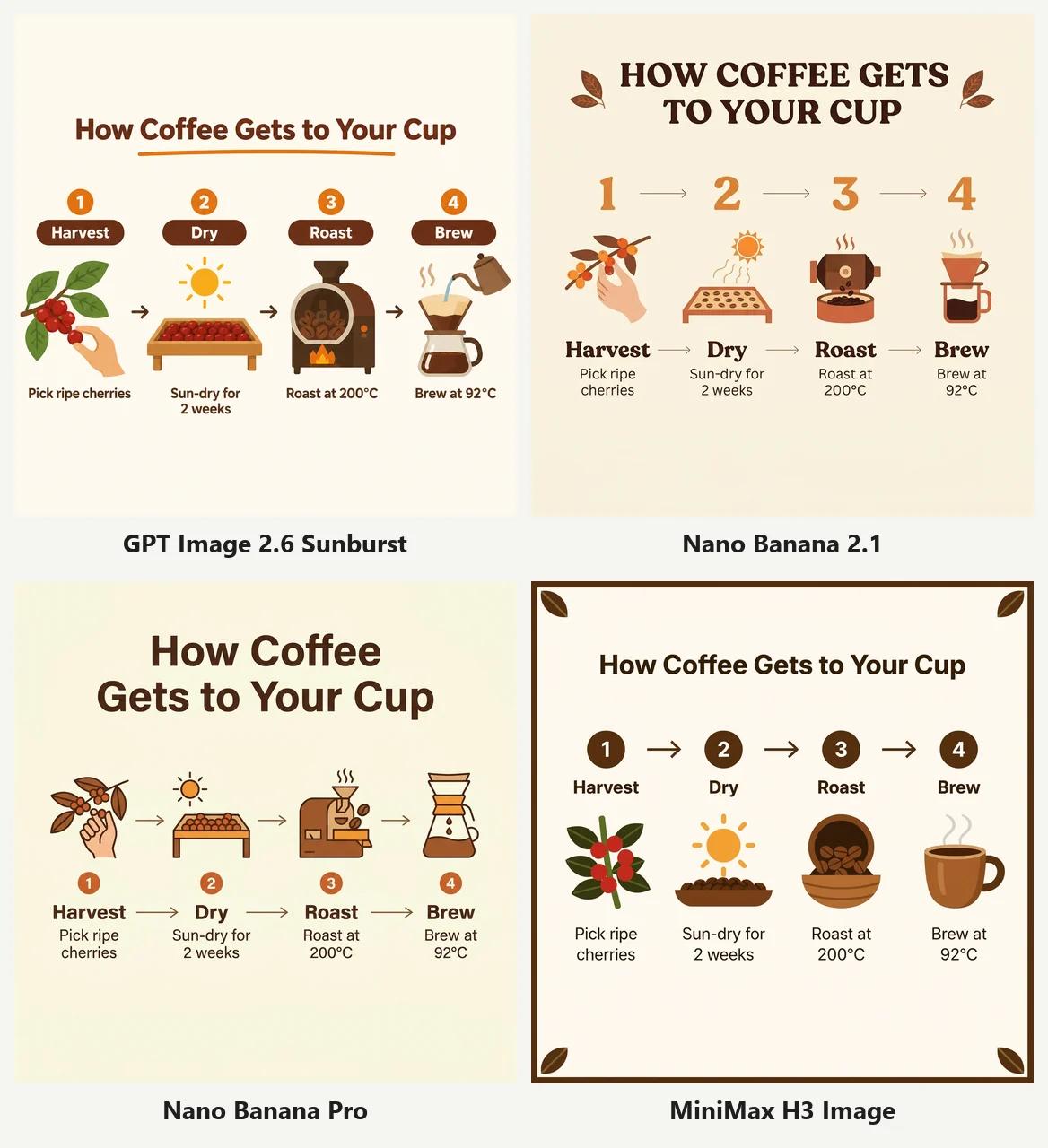
All 4 spelled everything correctly, degree signs included. MiniMax had the most fitting icons (coffee cherries, drying beans, roasted beans, a cup) and added a brown border with leaf corners.
Test 6: Watercolor illustration
A watercolor storybook page: a fox and a hedgehog sharing an umbrella in the rain on a forest path, with soft washes, paper texture and loose ink lines.
Watercolor children's book illustration: a small fox and a hedgehog sharing an umbrella in the rain, walking along a forest path. Soft washes, visible paper texture, loose ink outlines, muted greens and warm oranges.
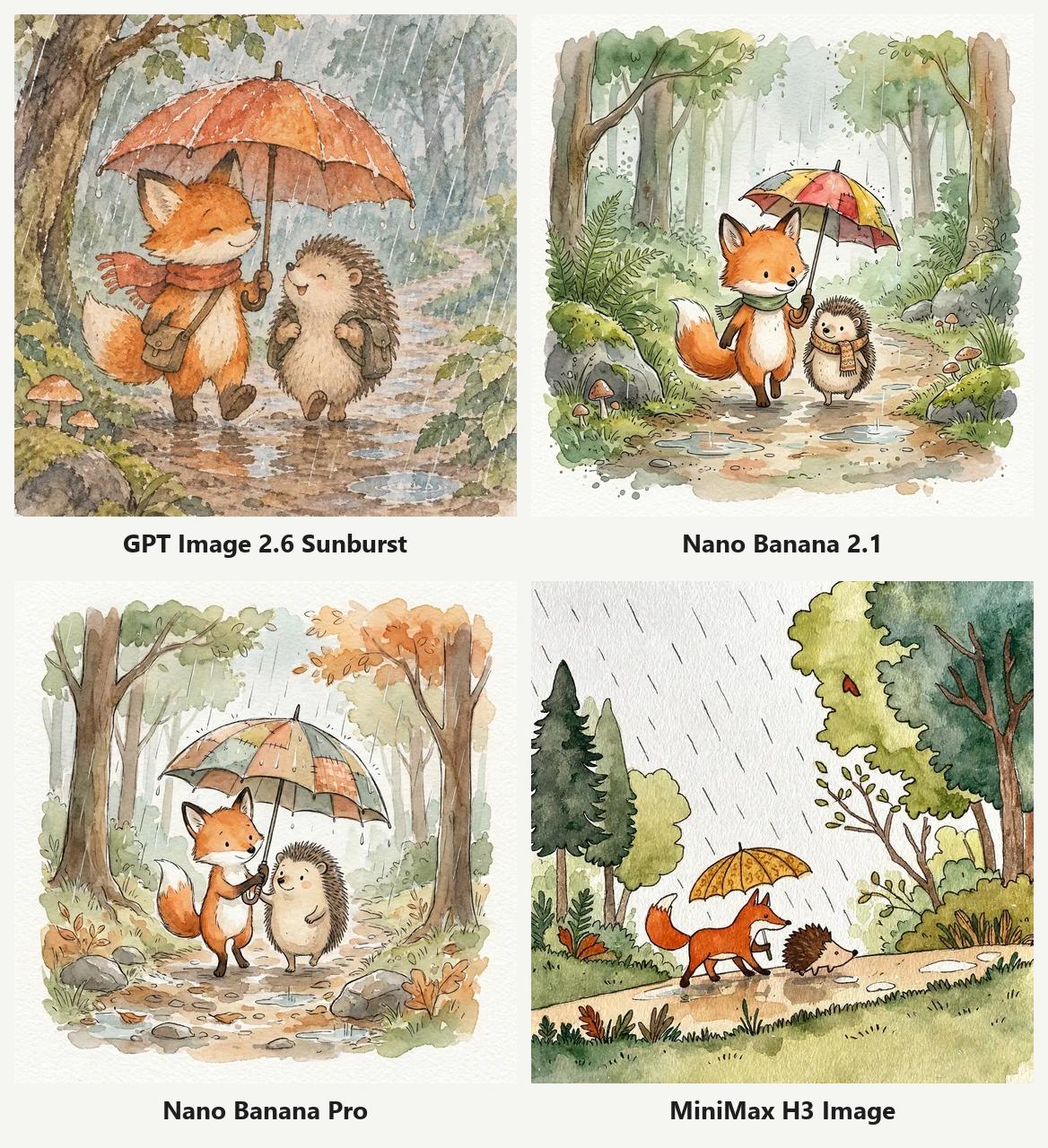
A mixed result for MiniMax:
- Style: its washes, paper texture and white space look the most like a real watercolor, even looser than Nano Banana;
- Composition: the fox holds the umbrella alone and the hedgehog walks outside it. The other three models put both animals under the umbrella.
For the right look and the right scene, Nano Banana 2.1 is still the safest pick.
Test 7: Following exact instructions
A top-down desk: exactly three apples on the left, a blue mug in the center, a notebook with a "Monday" sticky note on the right, round glasses at the bottom, and nothing else on the desk.
Top-down photo of a wooden desk. On the left: exactly three red apples. In the center: a blue ceramic mug. On the right: an open notebook with a yellow sticky note that says "Monday". A pair of round glasses at the bottom edge. Nothing else on the desk.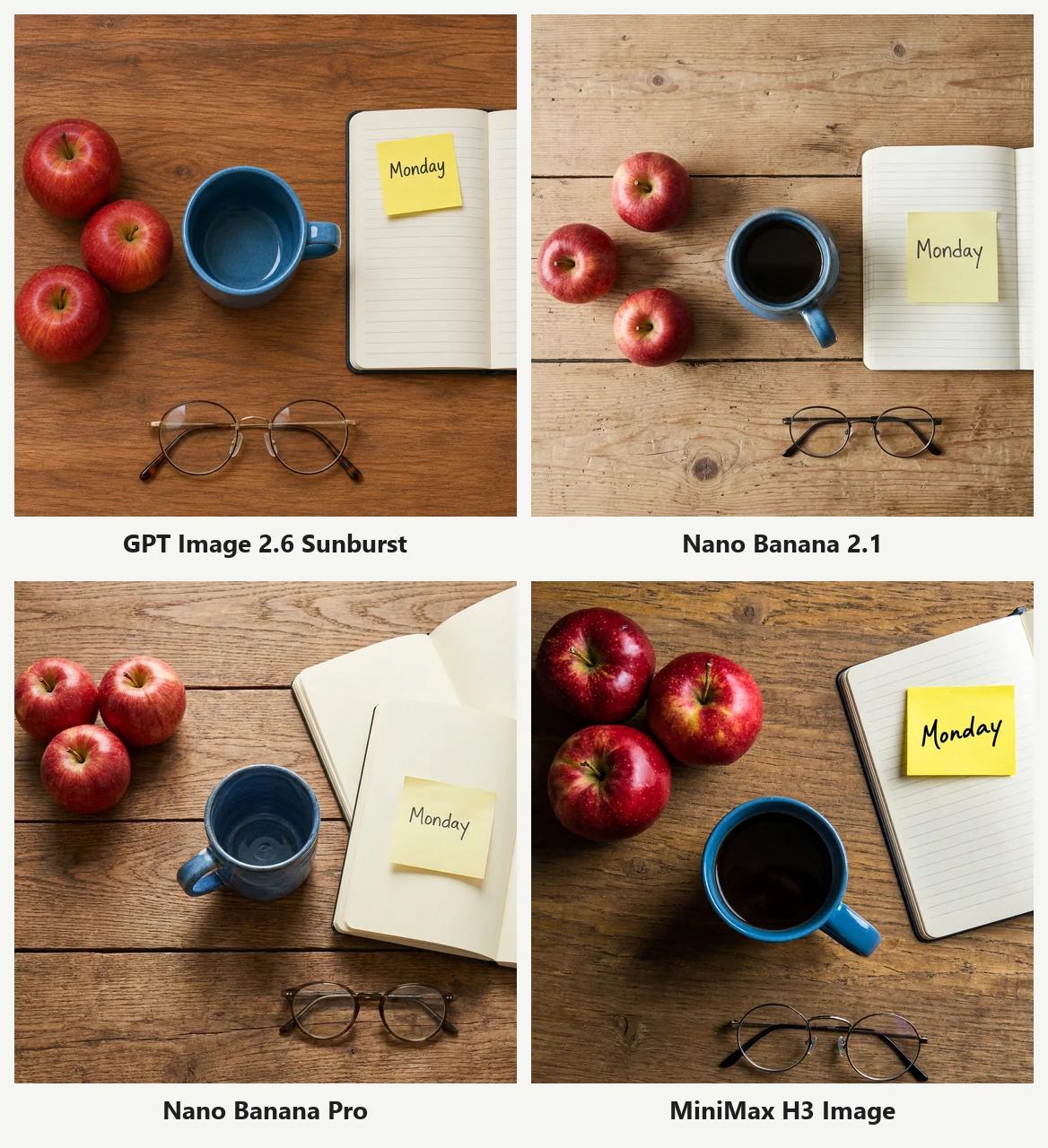
MiniMax H3 followed every instruction: three apples, one mug, one sticky note, one pair of glasses, nothing extra. Nano Banana Pro was again the one that broke the rules with a second notebook.
MiniMax with the enhancer off put two "Monday" notes on the desk, another sign that the default settings are the more reliable ones.
Test 8: Editing an uploaded photo
We uploaded the LUMIÈRE perfume bottle that GPT Image 2 made in our earlier comparison and asked each model to keep it exactly the same on a sunny beach:
Keep the perfume bottle from the reference image exactly the same: shape, glass, gold cap. Place it on a sunlit beach: pale sand, a few small shells, soft turquoise sea out of focus in the background. Bright summer daylight, the bottle casts a natural shadow on the sand.
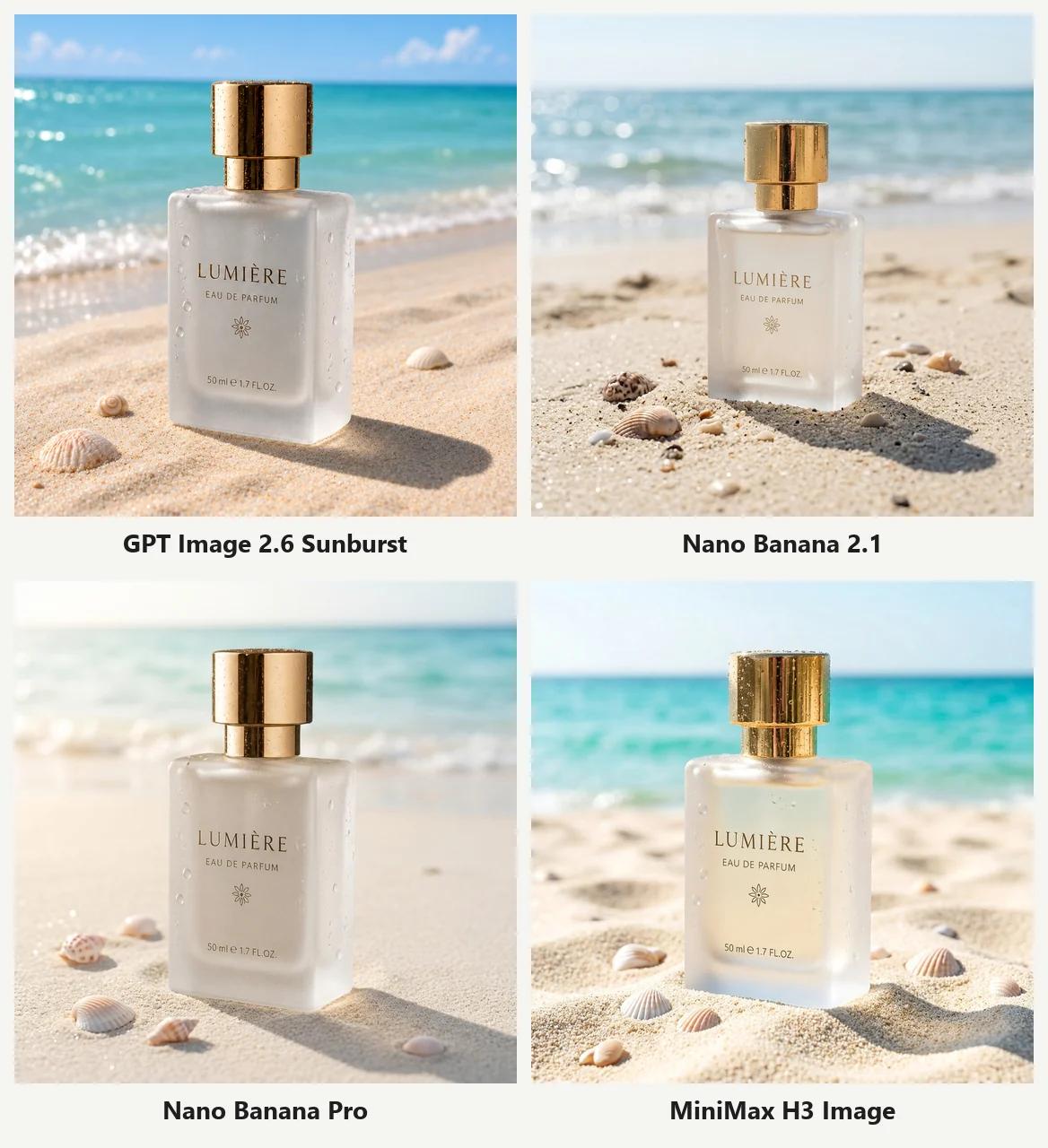
MiniMax H3 kept the bottle shape, label and flower emblem, and the sea is the turquoise the prompt asked for. The only change is that the liquid looks slightly more golden than in the original. Nano Banana 2.1 is still the only model that reshaped the bottle.
Test 9: Two reference images in one shot (new)
This tests the multi-reference feature MiniMax promotes. We uploaded two images, the woman GPT Image 2.6 made in test 4 and the perfume bottle from test 8, and asked for a beauty ad with her face, hair, sweater and the bottle all unchanged.
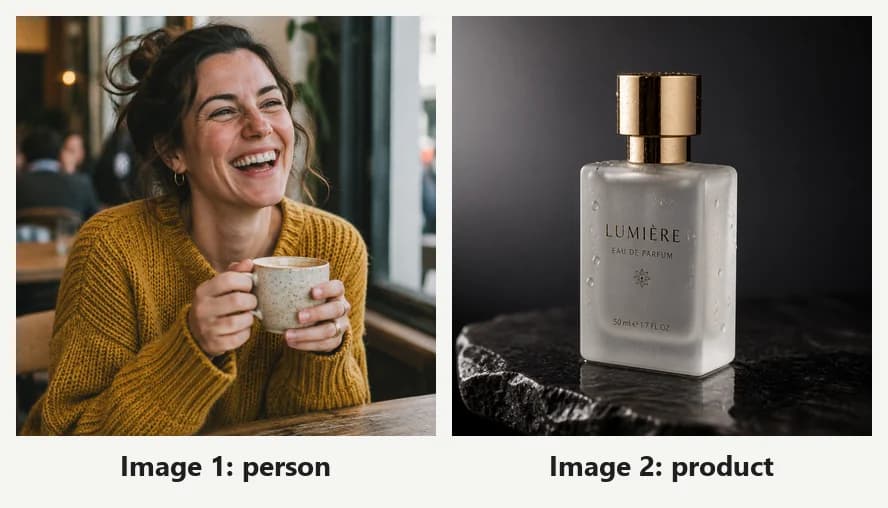
Use the woman from image 1 and the perfume bottle from image 2. Beauty campaign photo: she holds the perfume bottle up near her cheek with one hand and smiles softly at the camera. Keep her face, hair and mustard knit sweater the same as image 1. Keep the bottle exactly the same as image 2: frosted glass, gold cap, same shape. Plain warm beige studio background, soft beauty lighting.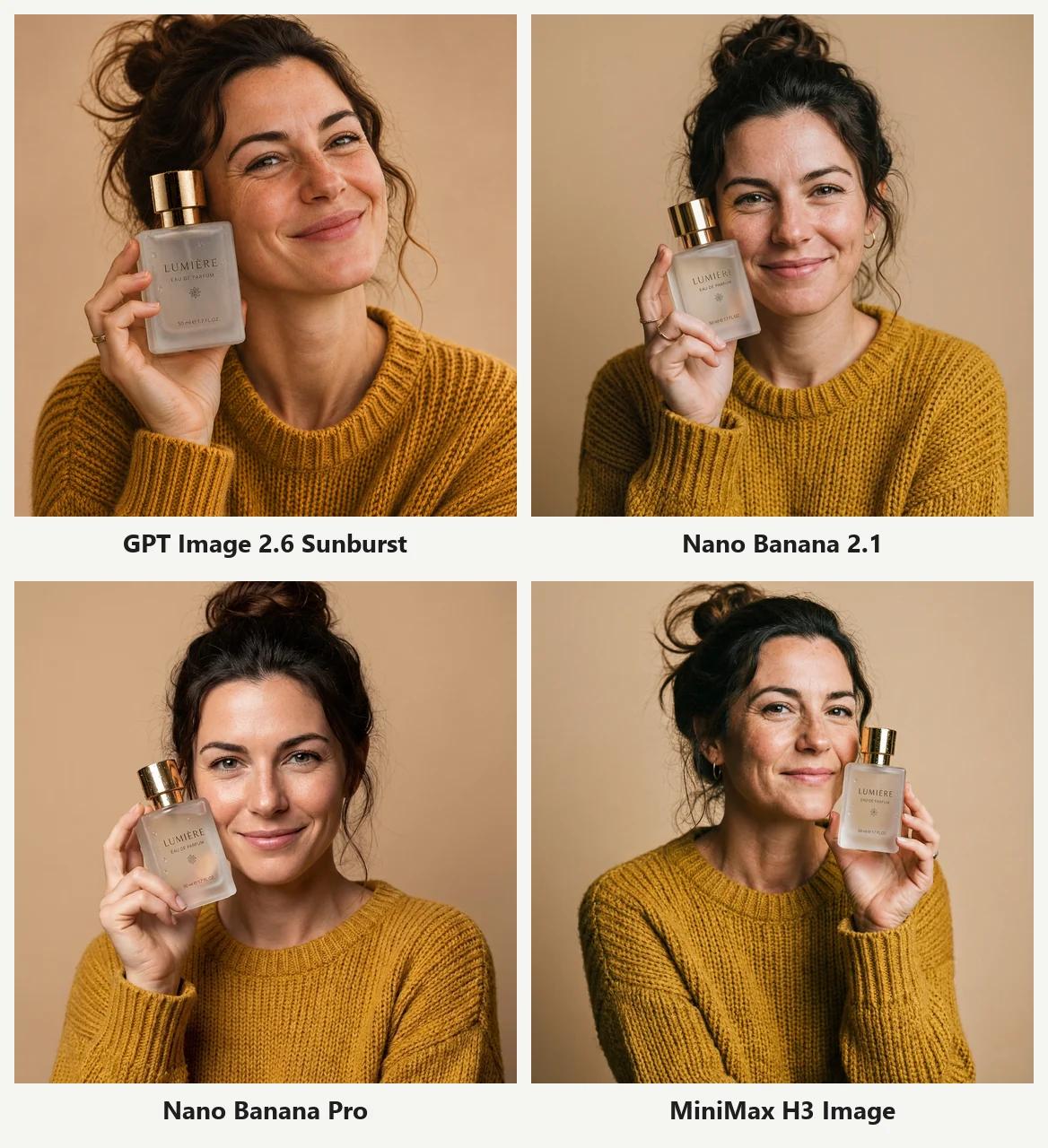
All 4 kept the bottle and the LUMIÈRE label. The faces are where they differ:
- GPT Image 2.6 is closest to the reference: freckles, curls and smile lines are all there;
- Nano Banana 2.1 is also close. Nano Banana Pro smoothed her skin and made her look younger;
- MiniMax H3 made her face thinner and a little older. She looks like a relative rather than the same person.
When you need the same person (a model, a mascot), GPT Image 2.6 is the safer choice.
Test 10: Photoreal close-up portrait (new)
A 70-year-old fisherman on a boat at dawn, deep wrinkles, grey stubble, a navy beanie, looking slightly off camera, light rain, 85mm at f/1.8, no retouching:
Close-up portrait of a 70-year-old fisherman on a boat at dawn, deep wrinkles, grey stubble, weathered skin, a knitted navy beanie, looking slightly off camera. Light rain on his face and jacket. Shot on an 85mm lens at f/1.8, natural light, realistic skin texture, no retouching.
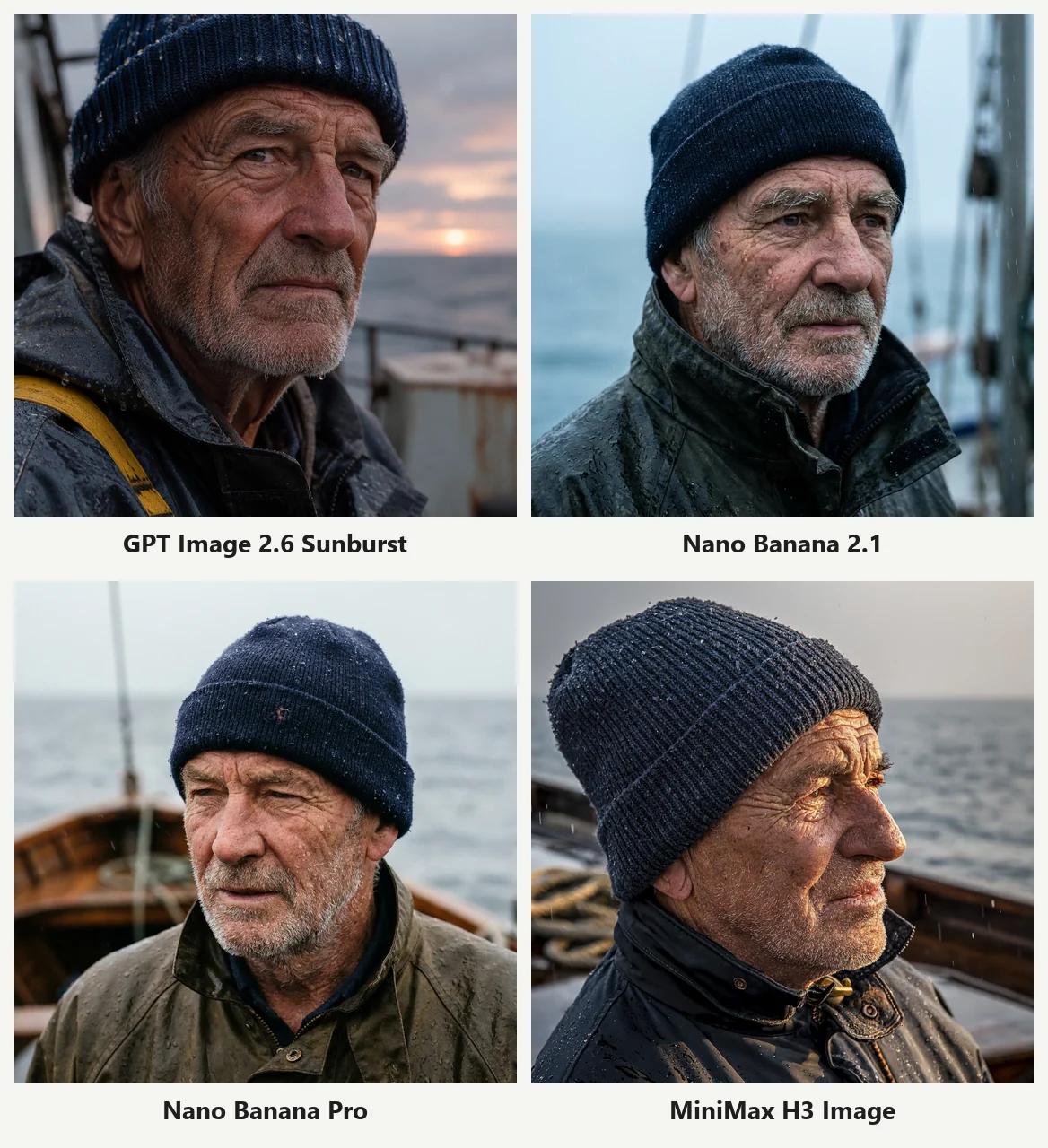
All four could pass as real photographs. GPT Image 2.6 put a sunrise on the horizon. Both Nano Banana models went cooler, closer to an overcast morning. MiniMax used side backlight to outline his face, with the sharpest wrinkles and raindrops, plus ropes and the boat rail behind him. No loser here; pick the light you prefer.
Test 11: Chinese e-commerce image (new)
The image online sellers make most: a thermos on white, with a headline, a selling-point line, three icons and a price tag that all need to be correct and in the right place.
一张电商主图,白色背景。中间是一只哑光墨绿色的不锈钢保温杯,杯盖是木纹色。左上角大标题「12 小时保温」,下面一行小字「316 不锈钢内胆 · 一键开盖」。右侧三个圆形小图标,图标下分别写着「保温」「防漏」「轻量 280g」。右下角红色价格标签「到手价 ¥89」。排版干净,文字清晰。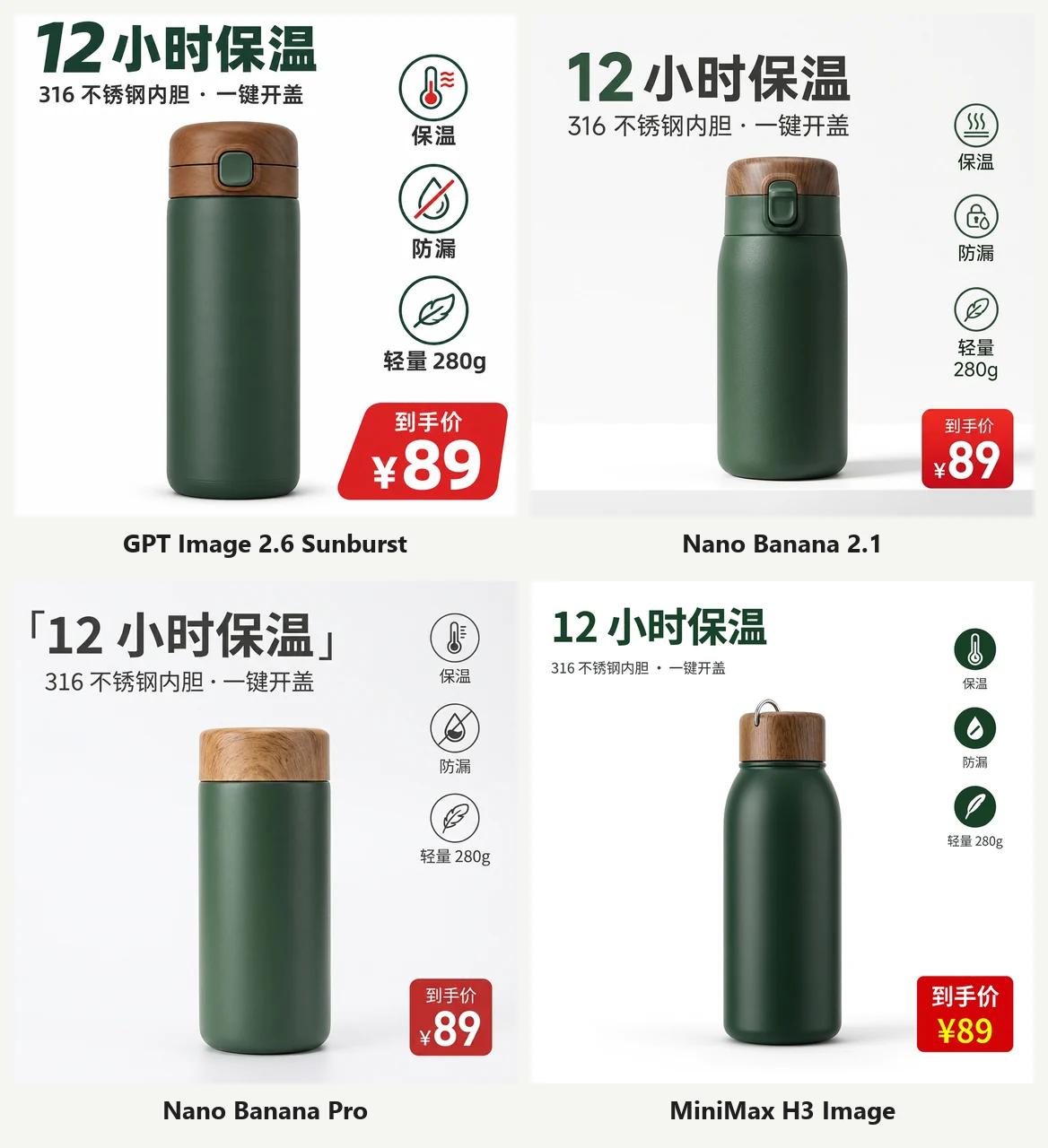
All 4 wrote the Chinese correctly, including "316", "280g" and "¥89". On layout:
- GPT Image 2.6 has the largest, boldest text and a price tag that looks like a real sale sticker;
- MiniMax H3 has the cleanest layout: icons stacked on the right, a red price tag bottom right, exactly as described;
- Nano Banana Pro printed the Chinese quotation brackets 「」 from the prompt as part of the headline, so it needs fixing.
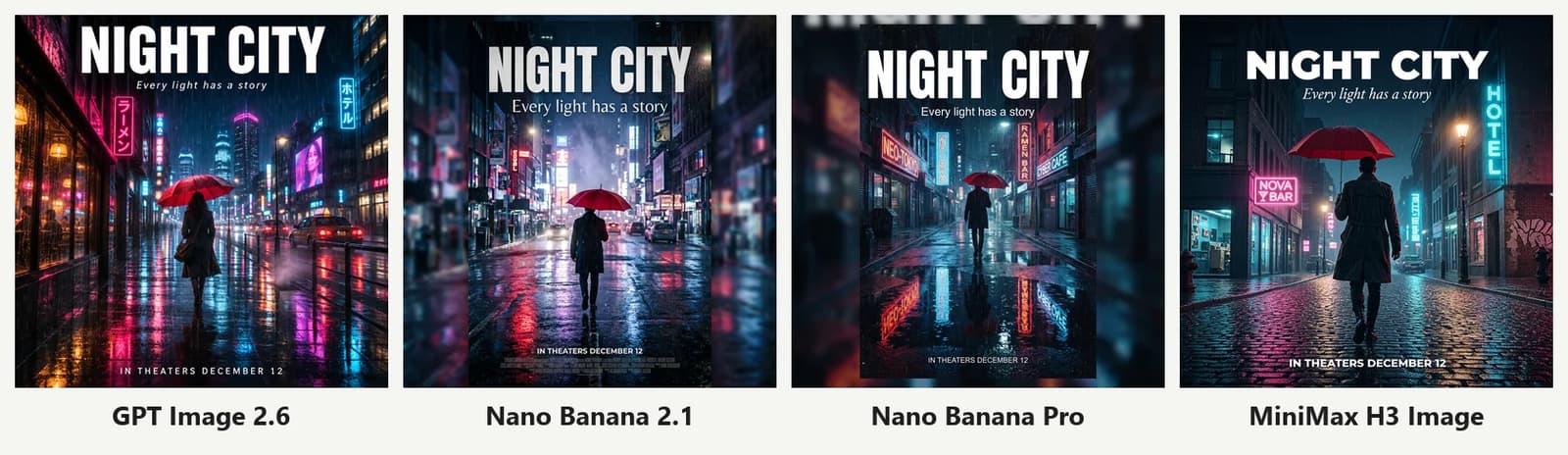
Test 12: English movie poster (new)
A rainy street at night, neon reflections, a figure with a red umbrella, the title "NIGHT CITY", a tagline and a release date:
A cinematic movie poster of a rainy city street at night, neon signs reflected in puddles, a lone figure with a red umbrella walking away from the camera. Large bold white title at the top: "NIGHT CITY". Under the title, a smaller tagline: "Every light has a story". At the bottom, small text: "IN THEATERS DECEMBER 12". Vertical poster composition inside the frame.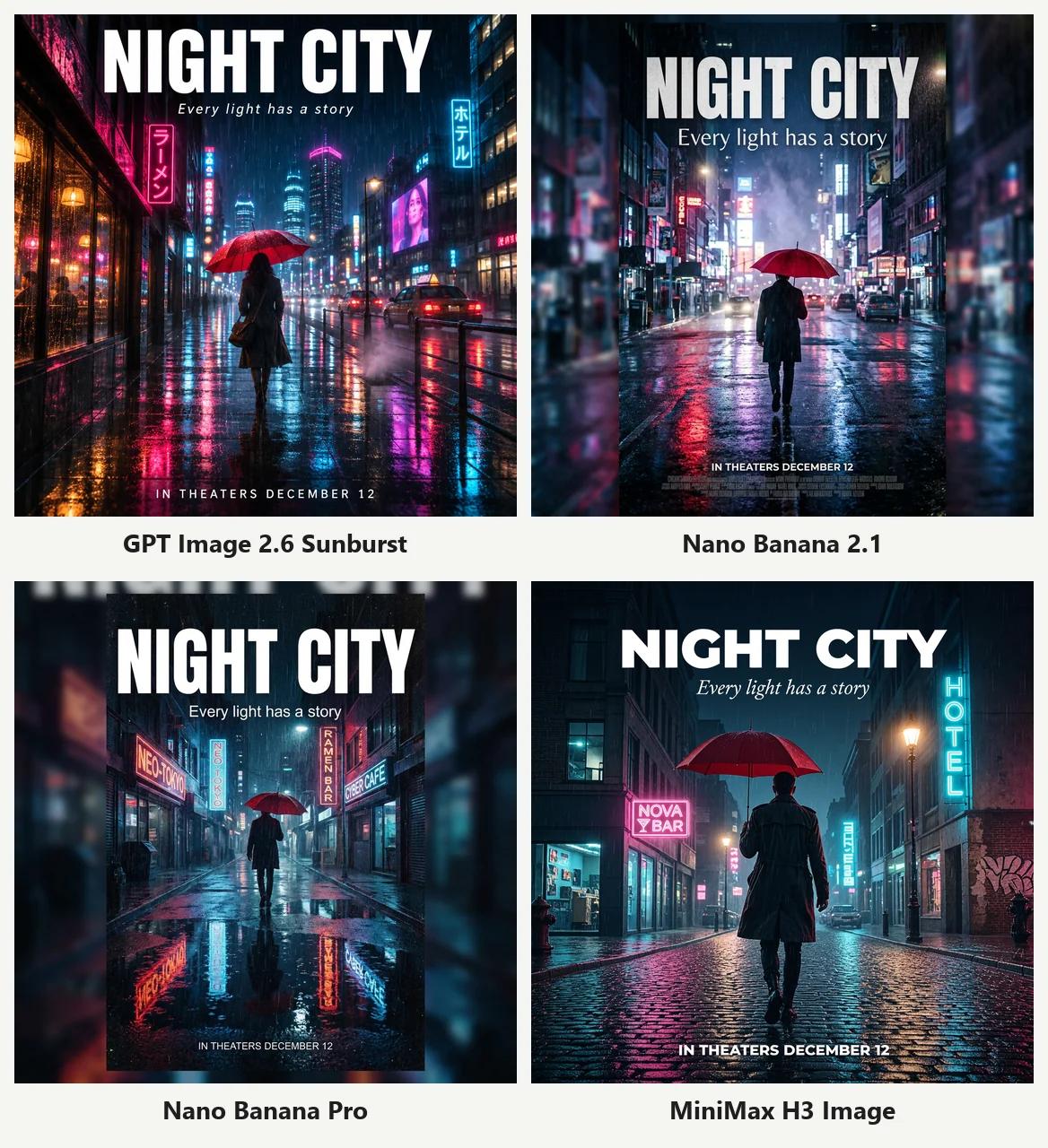
All 4 got all three lines of text right. MiniMax's poster fills the frame, with pink and blue neon reflected on cobblestones, and its signs ("NOVA BAR", "HOTEL") are real, readable words. Both Nano Banana models drew a physical poster in front of a blurred background.
Results at a glance
| Test | GPT Image 2.6 | Nano Banana 2.1 | Nano Banana Pro | MiniMax H3 |
|---|---|---|---|---|
| 1. English text | ✅ | ✅ | ✅ | ✅ |
| 2. Chinese poster | ✅ | ✅ | ❌ 3 errors | ✅ |
| 3. Product photo | ✅ (added label) | ✅ (added label) | ✅ | ✅ (added label) |
| 4. Person with hands | ✅ | ✅ | ✅ | ✅ |
| 5. Infographic | ✅ | ✅ | ✅ | ✅ |
| 6. Watercolor | Too heavy | ✅ Best fit | ✅ | ❌ Hedgehog left out |
| 7. Exact instructions | ✅ | ✅ | ❌ Extra notebook | ✅ |
| 8. Photo edit | ✅ | ❌ Bottle changed | ✅ | ✅ |
| 9. Two-image composite | ✅ Closest face | ✅ | ✅ (looks younger) | ⚠️ Face changed |
| 10. Photoreal portrait | ✅ | ✅ | ✅ | ✅ |
| 11. Chinese product shot | ✅ | ✅ | ⚠️ Extra brackets | ✅ |
| 12. English poster | ✅ | ✅ | ✅ | ✅ |
| Avg. time | 26 s | 38 s | 48 s | 23 s |
| Credits (1K) | 4 | 4 | 5 | 4 |
Which one should you use?
- MiniMax H3 Image: the surprise of this round. Every English and Chinese line was correct, only two of 12 tests were imperfect (watercolor composition and the face in the composite), it was the fastest, and it costs the same as GPT Image 2.6. Great for posters, product images, infographics and realistic photos. Keep the prompt enhancer on;
- GPT Image 2.6: still the most dependable all-rounder, especially when you need the same person across images. For speed, use the Flare version at the same price;
- Nano Banana 2.1: first choice for watercolor and illustration, but don't use it to edit product photos;
- Nano Banana Pro: good for clean, label-free product shots, but it is the slowest and priciest, and the most likely to get Chinese text wrong.
Same advice as before: when an image doesn't work, keep the prompt and switch models first. With MiniMax H3 in the model menu, you now have a strong second opinion next to GPT Image 2.6.
Try it yourself
- Open the MiniMax H3 Image page; the generator already has MiniMax H3 selected;
- Paste any prompt from this article and keep 1:1 at 1K (4 credits per image);
- Switch to GPT Image 2.6 or Nano Banana 2.1 in the model menu and run the same prompt;
- Compare the results in your history.
For resolutions, the Highspeed version and the prompt enhancer switch, see MiniMax H3 Image review and tips.
FAQ
Is MiniMax H3 Image better than GPT Image 2.6? They were very close across these 12 tests. Both got every line of text right, MiniMax was about 3 seconds faster on average, and they cost the same. GPT Image 2.6 was better at keeping a face consistent across reference images; MiniMax had nicer infographic icons and poster atmosphere. Try both and keep the one you like.
Can MiniMax H3 write Chinese text? Yes. In both Chinese tests (the tea poster and the product image) it got every character right, including numbers, units and the price symbol. Still proofread before you publish.
Why keep the prompt enhancer on? The enhancer first rewrites your prompt into a longer, more detailed English description, then generates from it. When we reran several tests with it off, we got a "Flat Whitte" typo, a duplicated sticky note, gibberish labels and blue-and-white porcelain instead of celadon. Unless you need the model to follow your exact wording, leave it on.
How many reference images can MiniMax H3 use? Up to 16, the same as GPT Image 2.6; Nano Banana takes up to 14. With reference images, the prompt enhancer is always on.
Why only one run per model? Rerolling until you're happy tests your patience, not the model. A model that gets it right first time saves you time and credits. You will reroll in real use, so read these results as tendencies.
All images in this article were generated on Image2 (image-2.net) on November 12–13, 2026 with the settings above. Models keep changing, so rerunning these tests later may give different results.