Every new image model is "the best" on launch day. What you actually need to know is which one gets your kind of image right on the first try, how long it takes and what it costs.
Image2 has five image models in the same generator, so we ran a simple test: the same 8 prompts, word for word, through all five, with the same settings and no rerolls. That's 40 images covering English text, Chinese text, a product photo, a person with hands, an infographic, a watercolor illustration, an exact desk layout and a photo edit.
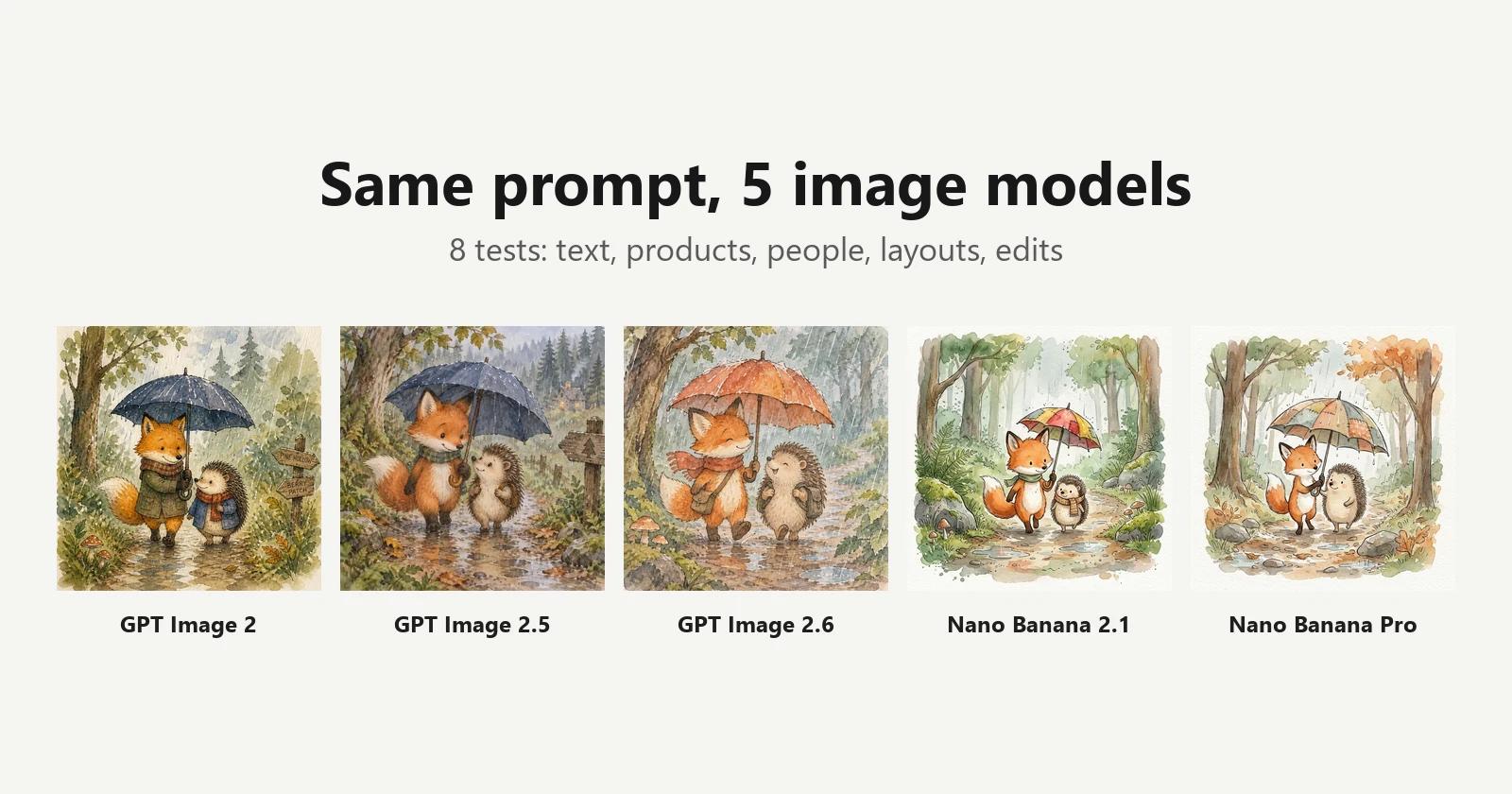
Update (November 13, 2026): we ran these prompts through the new MiniMax H3 Image as well. See MiniMax H3 vs GPT Image 2.6 vs Nano Banana.
The short answer
| What you're making | Pick | Why |
|---|---|---|
| Posters, menus, anything with Chinese text | GPT Image 2.6 (or 2.5) | All three GPT models got every Chinese character right; Nano Banana Pro made three mistakes |
| Cheap, fast drafts | GPT Image 2 or 2.5 Sunburst | 2 credits and about 15–18 seconds per image, the fastest in this test |
| The best all-rounder | GPT Image 2.6 Sunburst | Got every word and instruction right, with the richest detail; 4 credits |
| Clean product shots with no label | Nano Banana Pro | The only model that didn't invent a brand name on the bottle |
| Light, real-looking watercolor | Nano Banana 2.1 | Paper texture, white space and loose washes closest to the prompt |
| Candid lifestyle photos | Nano Banana 2.1 / Pro | Wider, busier framing that feels less posed |
| Editing a photo you upload | GPT Image 2.6 (or Nano Banana Pro) | Kept the product and its label unchanged; Nano Banana 2.1 reshaped the bottle |
The pattern: GPT models are the safer choice when text or exact instructions matter; Nano Banana models are worth a try when you want a looser, more natural photo or illustration. No model won everything, which is the best argument for trying a second model before giving up on a prompt.
The five models
| Model | Made by | Credits at 1K (Standard) | Average time in this test | Max reference images |
|---|---|---|---|---|
| GPT Image 2 | OpenAI | 2 | 15 s | 16 |
| GPT Image 2.5 Sunburst | OpenAI | 2 | 18 s | 16 |
| GPT Image 2.6 Sunburst | OpenAI | 4 | 28 s | 16 |
| Nano Banana 2.1 | Google (Gemini) | 4 | 36 s | 14 |
| Nano Banana Pro | Google (Gemini 3 Pro Image) | 5 | 51 s | 14 |
Prices are for text-to-image. When you edit with reference images, GPT models settle on the actual generation cost, so the final charge can differ a little from the table; Nano Banana keeps its fixed price.
GPT Image 2.5 and 2.6 each come in two editions, Flare and Sunburst, at the same price. We used Sunburst for both because this is a quality comparison. Flare is much faster: in our GPT Image 2.6 Flare vs Sunburst test it averaged about 10 seconds.
How we tested
- Same prompt, word for word, for all five models;
- Same settings: 1:1, 1K, Standard quality for the GPT models (Nano Banana has no quality setting);
- First result only: no rerolls, no prompt tweaks between models;
- for each test, all five tasks were submitted at the same time, so they ran under the same load;
- times run from submitting the task to the image being downloaded, so they include a few seconds of polling and transfer. Use them to compare models, not as exact numbers.
One run per model is a small sample, so treat these results as tendencies rather than guarantees. In each comparison image, the top row is GPT Image 2, 2.5 Sunburst and 2.6 Sunburst; the bottom row is Nano Banana 2.1 and Nano Banana Pro.
Test 1: English text on a chalkboard menu
A chalkboard menu hanging in a cozy café, hand-lettered in white chalk. Title: "Today's Brews". Items with prices: "Flat White $4.50", "Oat Latte $5.00", "Cold Brew $4.00", "Chai Tea $3.75". Small chalk doodle of a coffee cup in the corner. Warm morning light.
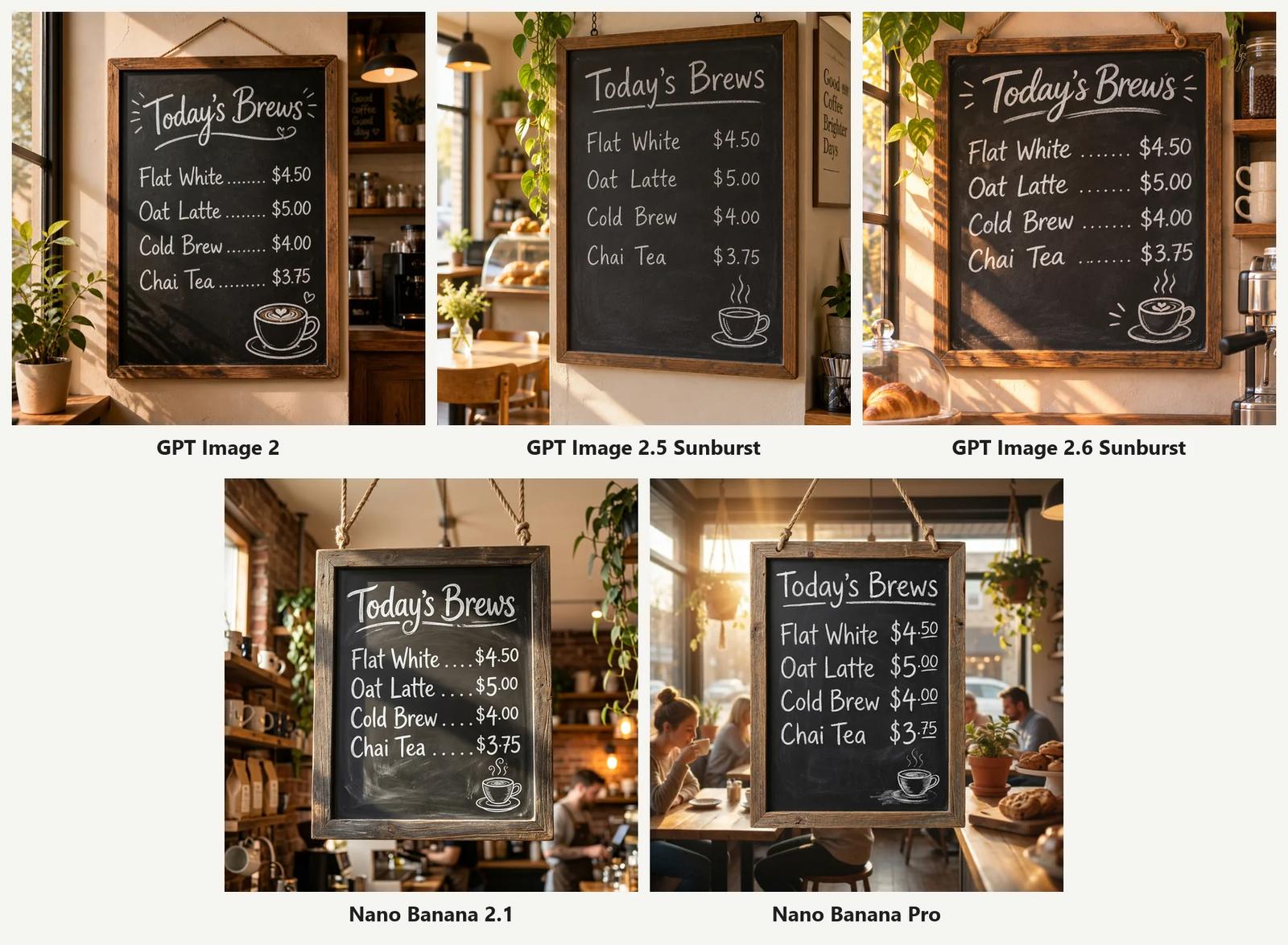
All five got it right: title, four items, four prices, correct order. English text on a sign is no longer a problem for any of these models.
The differences are in what else ended up in the picture:
- GPT Image 2 and 2.5 each added a second sign in the background that we didn't ask for ("Good coffee, Good day" and "Good … Coffee, Brighter Days", with one garbled word in the second);
- GPT Image 2.6 made the cleanest board: dotted leaders between items and prices, steam on the cup doodle, warm side light;
- both Nano Bananas hung the board in a busy café with people in the background, which looks more like a real photo. Nano Banana Pro wrote the cents as small raised numbers ($4⁵⁰), the way people actually letter chalkboards.
Test 2: Chinese text on a tea poster
The prompt is in Chinese: a new-Chinese-style tea poster with a vertical calligraphy title 「一盏秋茶」, two lines of small text with a date and an offer, and a red seal reading 「茶」.
一张竖版风格的新中式茶饮海报,米白色宣纸质感背景,左侧一杯冒着热气的青瓷盖碗茶,旁边几片茶叶。右侧竖排大标题书法字「一盏秋茶」。下方横排小字:「桂花乌龙 · 限时上新」和「11月15日 起 · 第二杯半价」。整体留白充足,配色为米白、墨黑和一点朱红印章,印章上写「茶」。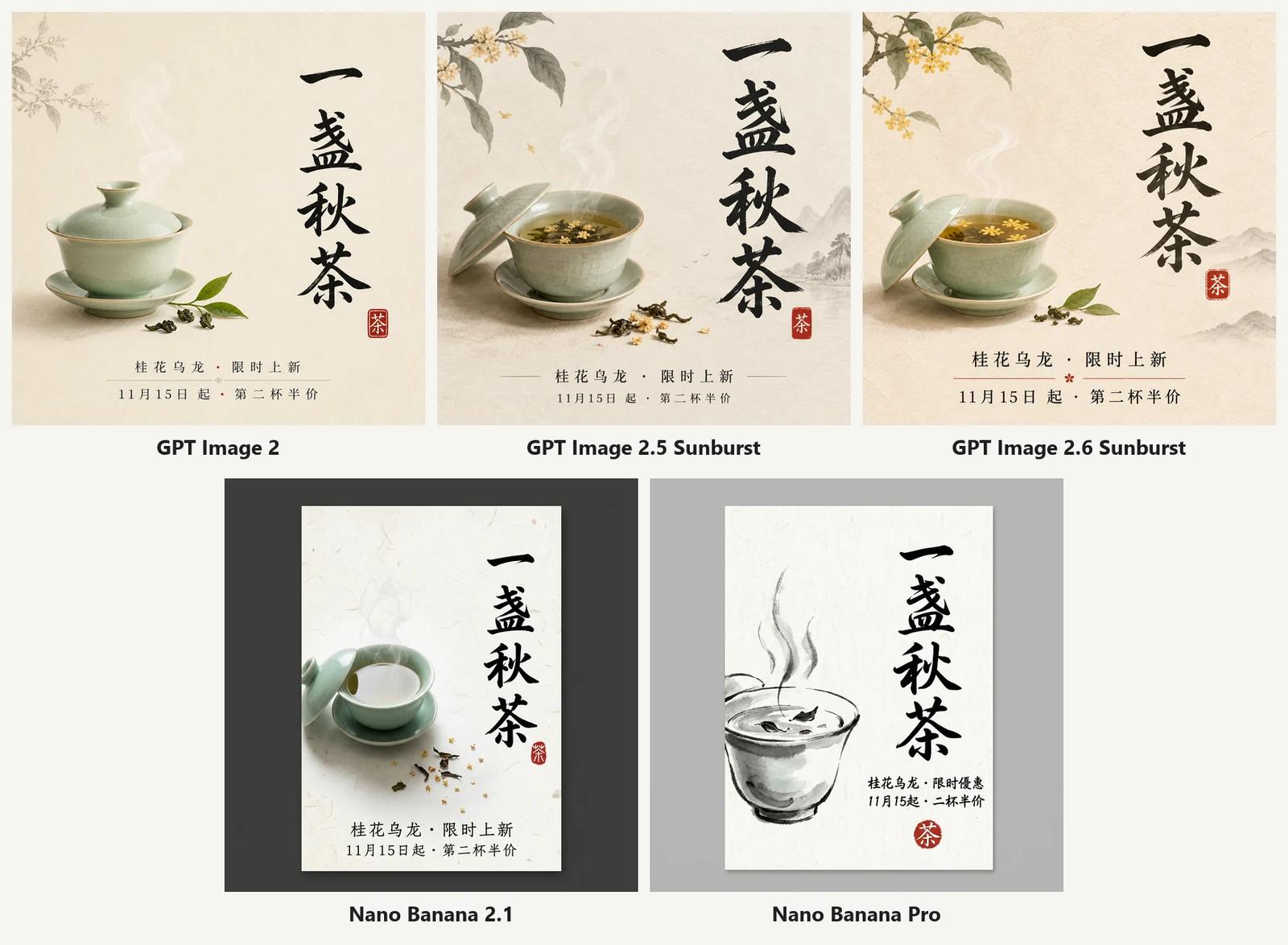
This was the biggest gap in the whole test.
- GPT Image 2, 2.5 and 2.6: every character correct, in the title, both small lines and the seal. 2.5 and 2.6 also added osmanthus branches and distant ink mountains, and 2.6 floated osmanthus flowers in the tea, a nice touch for an osmanthus oolong;
- Nano Banana 2.1: all text correct, but it drew the poster as a vertical print on a dark background instead of filling the square;
- Nano Banana Pro: three mistakes in the small text. "限时上新" (new for a limited time) became "限时優惠" (limited-time offer, with a traditional character), "11月15日起" lost the 日, and "第二杯半价" lost the 第. The cup also turned into a grey ink sketch, losing the celadon green.
If your image has Chinese text, use a GPT model. Nano Banana 2.1 got it right this time, but the GPT models also handled the layout better.
Test 3: Product photo
Studio product photo of a frosted glass perfume bottle with a gold cap, standing on a slab of wet black stone. Soft key light from the left, subtle reflection on the stone, a few water droplets on the bottle. Dark gradient background. Shot on a 100mm macro lens.
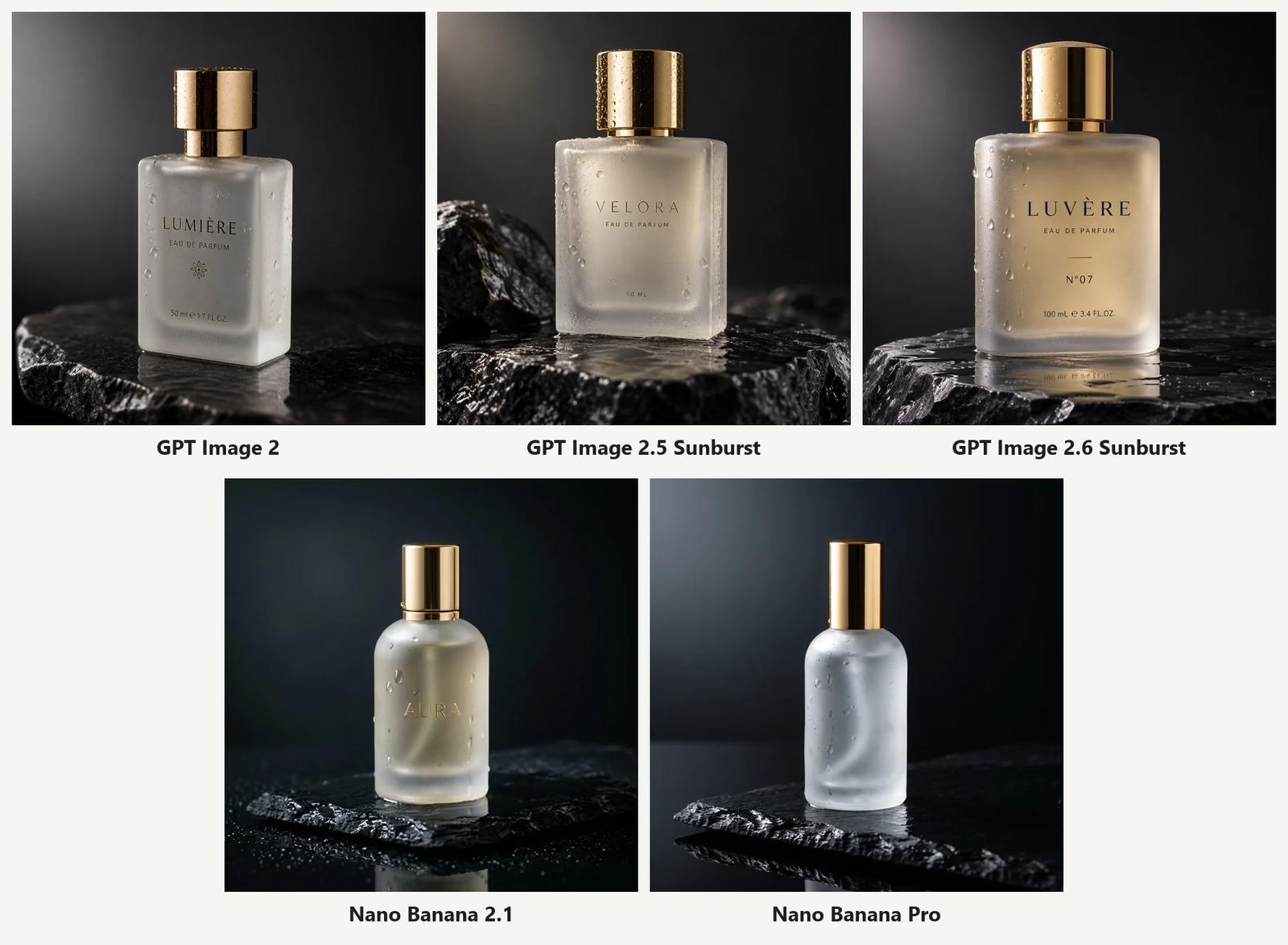
All five look like real studio shots: believable frosted glass, gold caps, droplets and reflections. The surprise is the label:
- all three GPT models invented a brand name (LUMIÈRE, VELORA, LUVÈRE N°07), with "Eau de Parfum" and a volume, all spelled correctly;
- Nano Banana 2.1 embossed "AURA" on the glass;
- Nano Banana Pro left the bottle blank, exactly as described.
A made-up label is fine for a mood board but a problem if you want to add your own logo later. Either use Nano Banana Pro, or add "no text or logo on the bottle" to a GPT prompt. GPT Image 2.6 had the most polished lighting, with a warm glow through the glass and a clear reflection in the wet stone.
Test 4: A person with hands
Candid photo of a woman in her 30s laughing at a café table, holding a ceramic coffee cup with both hands. Natural window light, shallow depth of field, slight film grain. Wearing a mustard knit sweater.
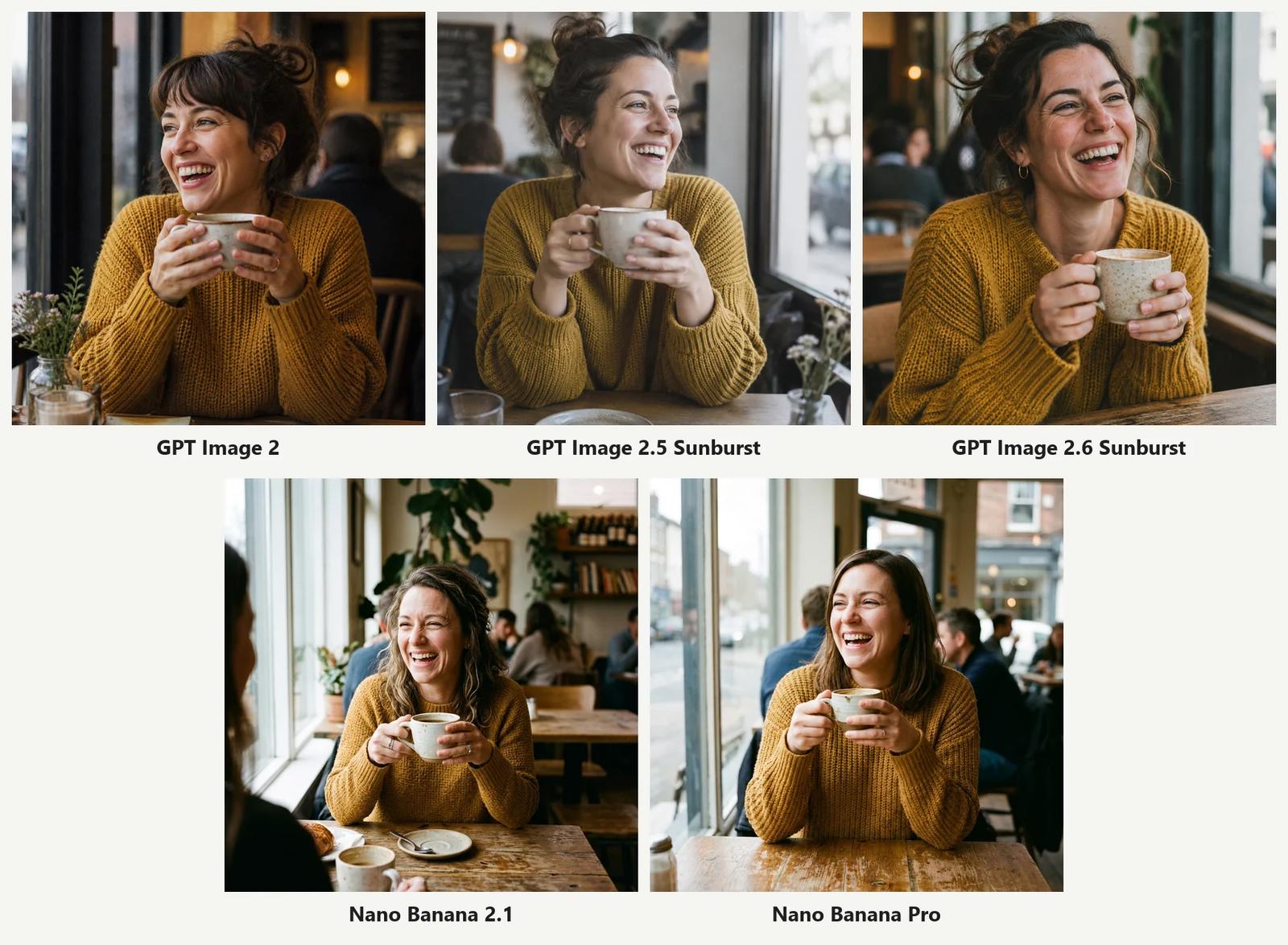
No broken hands anywhere. We zoomed into all five: five fingers per hand, natural grips, rings in sensible places. Hands are no longer the giveaway they were a year ago.
The real difference is framing:
- the GPT models go close, like a portrait: face and sweater fill the frame, and 2.6 shows the most skin texture, down to the laugh lines;
- the Nano Banana models step back and show the café, other customers and the street outside. Nano Banana 2.1 even put a friend's shoulder in the foreground. This matches "candid" better.
Test 5: Infographic
A clean flat-design infographic titled "How Coffee Gets to Your Cup", showing 4 numbered steps left to right with simple icons: 1 "Harvest", 2 "Dry", 3 "Roast", 4 "Brew". Under each step a short caption: "Pick ripe cherries", "Sun-dry for 2 weeks", "Roast at 200°C", "Brew at 92°C". Thin arrows between steps. Cream background, brown and orange color palette. Lots of white space.
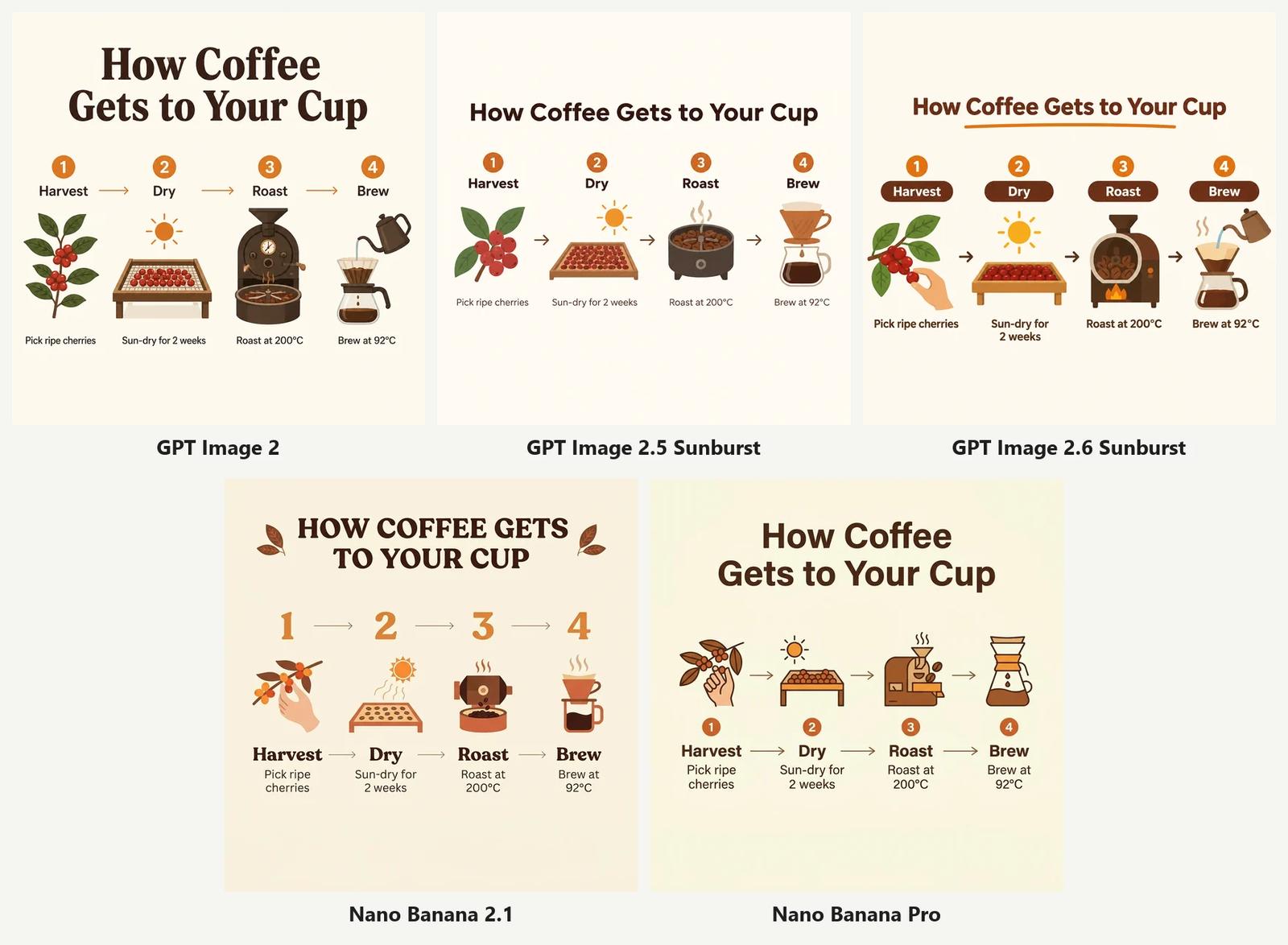
All five spelled everything correctly, including the degree signs, and all kept the four steps in order. The differences are design choices:
- GPT Image 2.6 is the most finished: labels in brown pills, an underlined title and a hand picking cherries in step 1;
- GPT Image 2 has the biggest, boldest title, while 2.5 is the most minimal;
- Nano Banana 2.1 turned the title into all caps and made the numbers huge;
- Nano Banana Pro drew two sets of arrows, one between the icons and one between the labels, which looks a little busy.
For infographics you can pick on taste; none of them needs fixing.
Test 6: Watercolor illustration
Watercolor children's book illustration: a small fox and a hedgehog sharing an umbrella in the rain, walking along a forest path. Soft washes, visible paper texture, loose ink outlines, muted greens and warm oranges.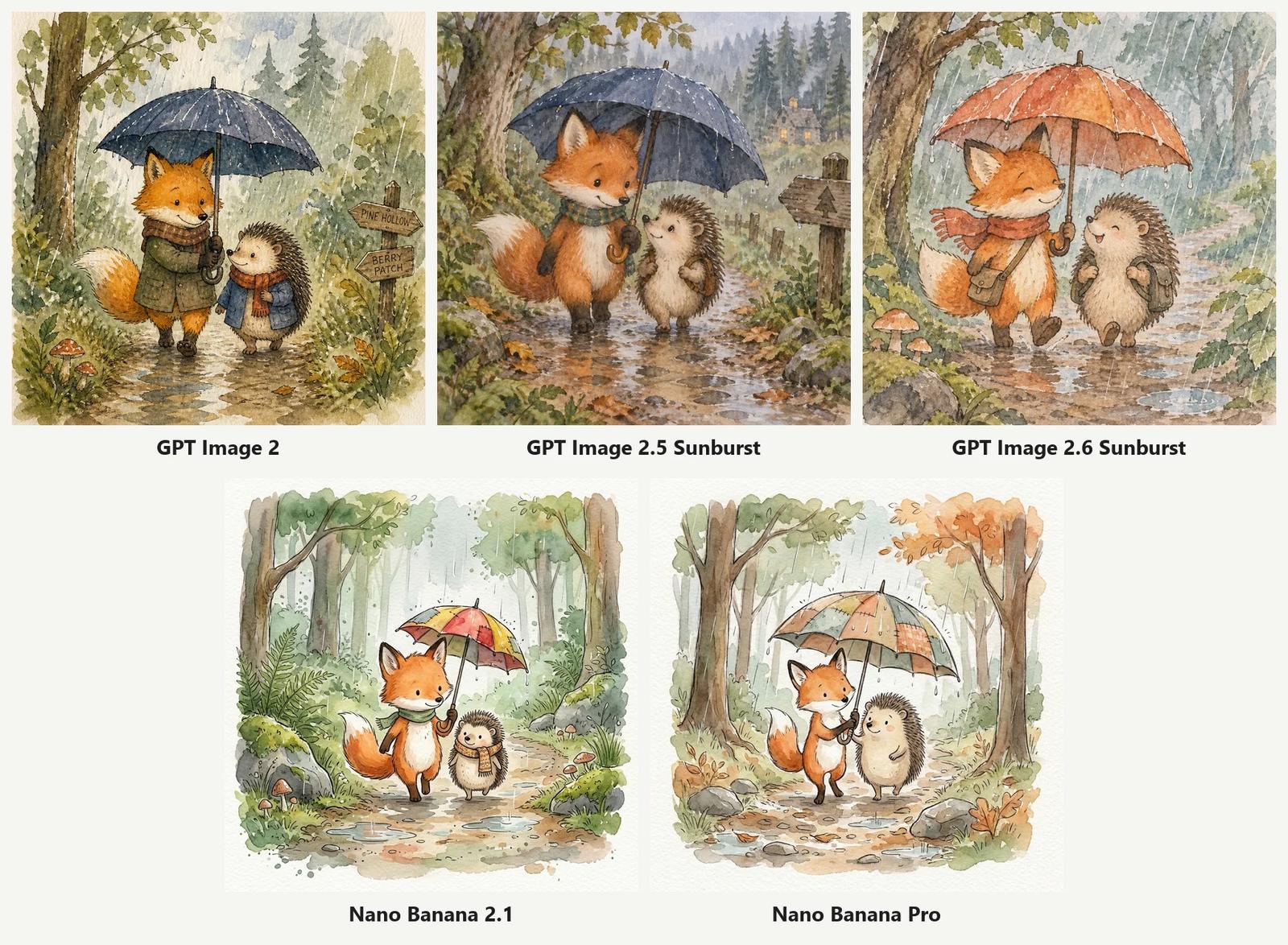
This one splits cleanly by family:
- the GPT models paint full, dense storybook scenes: dark forests, puddles, mushrooms and outfits (scarves, coats, backpacks). Beautiful, but closer to gouache than to loose watercolor. GPT Image 2 also added a signpost with text we didn't ask for;
- the Nano Banana models leave white paper around the edges, use lighter washes and visible paper grain, and keep the ink lines loose. That is much closer to "soft washes, visible paper texture, loose ink outlines".
For a real watercolor look, Nano Banana 2.1 was the best match. For a richer picture-book page, the GPT models give you more.
Test 7: Following exact instructions
Top-down photo of a wooden desk. On the left: exactly three red apples. In the center: a blue ceramic mug. On the right: an open notebook with a yellow sticky note that says "Monday". A pair of round glasses at the bottom edge. Nothing else on the desk.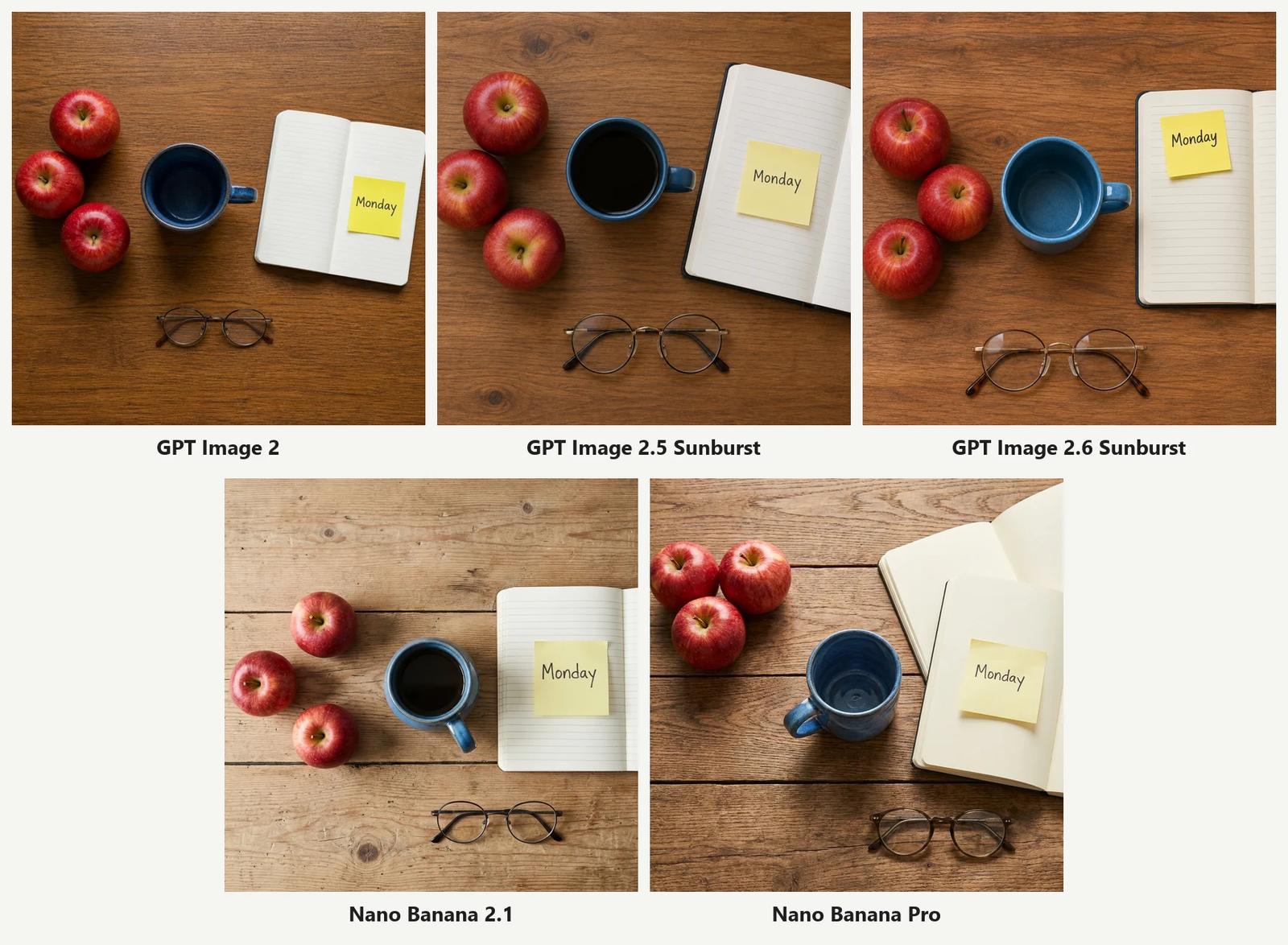
Counting used to trip up image models. Not anymore: all five drew exactly three apples, a blue mug, a "Monday" sticky note and round glasses at the bottom.
Only one model broke a rule: Nano Banana Pro added a second notebook, even though the prompt said "nothing else on the desk", and its mug drifted left of center. It was also the slowest image in the whole test at 103 seconds. The three GPT models and Nano Banana 2.1 followed every instruction.
👉 Try this layout prompt (switch models in the model menu to compare)
Test 8: Editing an uploaded photo
We took the GPT Image 2 bottle from Test 3 (top left in that comparison), uploaded it as a reference image and gave every model the same instruction:
Keep the perfume bottle from the reference image exactly the same: shape, glass, gold cap. Place it on a sunlit beach: pale sand, a few small shells, soft turquoise sea out of focus in the background. Bright summer daylight, the bottle casts a natural shadow on the sand.
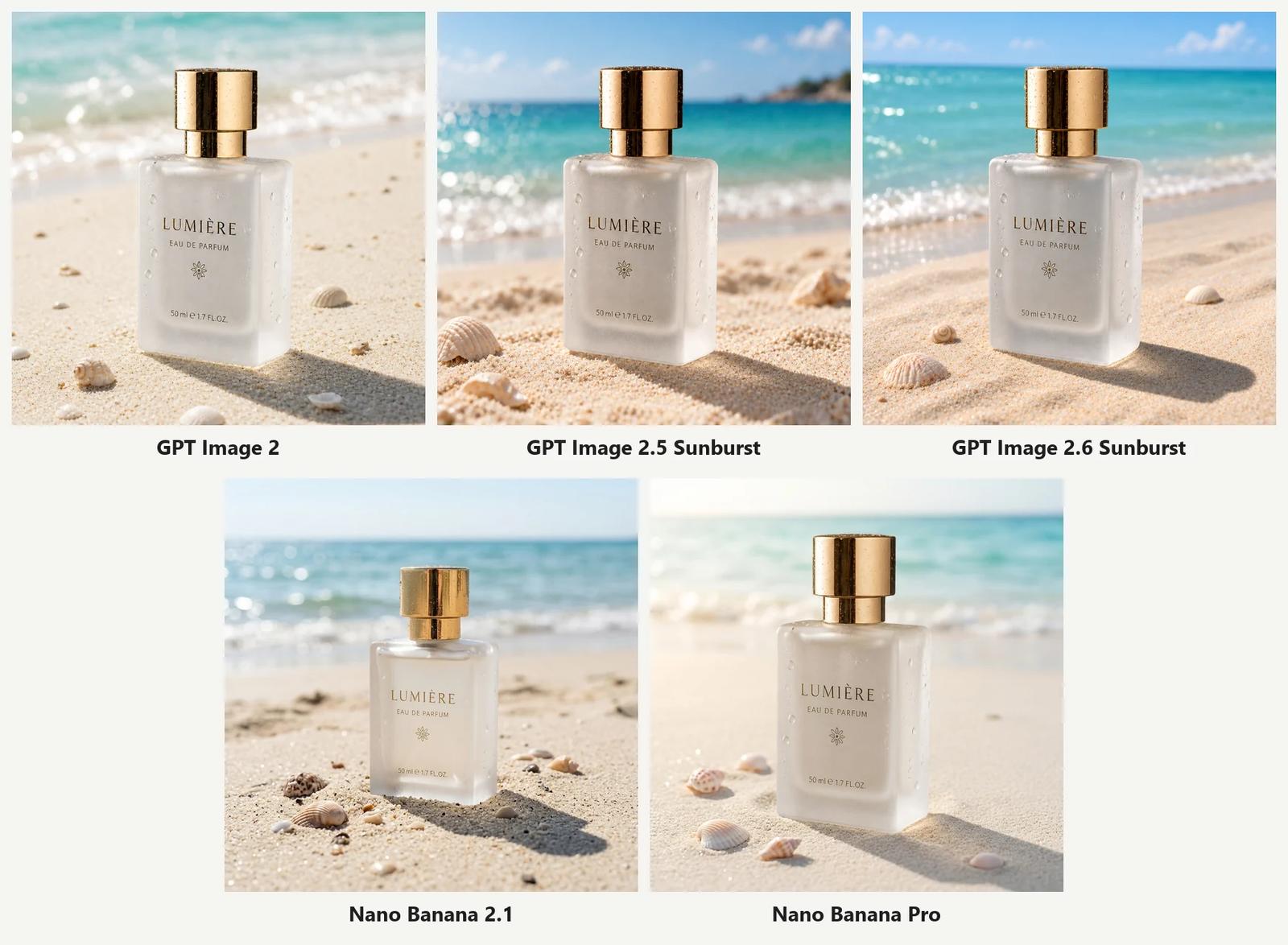
This is the test that matters most for product sellers, because a changed bottle is a wrong product.
- GPT Image 2, 2.5 and 2.6 kept the bottle almost pixel for pixel: the LUMIÈRE label, the flower mark, "50 ml e 1.7 FL.OZ.", even the water droplets. Each placed it with a long, believable shadow on the sand;
- Nano Banana Pro also kept the bottle, label and droplets, with a softer, hazier summer light;
- Nano Banana 2.1 kept the label text but changed the bottle: the body became shorter and squatter, the droplets disappeared and the base sank into the sand.
For product edits, use a GPT model or Nano Banana Pro. The GPT models were also two to three times faster here.
Results at a glance
| Test | GPT Image 2 | GPT Image 2.5 | GPT Image 2.6 | Nano Banana 2.1 | Nano Banana Pro |
|---|---|---|---|---|---|
| 1. English text | ✅ (extra sign) | ✅ (extra sign) | ✅ | ✅ | ✅ |
| 2. Chinese text | ✅ | ✅ | ✅ | ✅ | ❌ 3 errors |
| 3. Product photo | ✅ (added label) | ✅ (added label) | ✅ (added label) | ✅ (added label) | ✅ |
| 4. Person with hands | ✅ | ✅ | ✅ | ✅ | ✅ |
| 5. Infographic | ✅ | ✅ | ✅ | ✅ | ✅ |
| 6. Watercolor style | Dense, extra text | Dense | Dense | ✅ Best match | ✅ |
| 7. Exact instructions | ✅ | ✅ | ✅ | ✅ | ❌ extra notebook |
| 8. Photo edit | ✅ | ✅ | ✅ | ❌ reshaped bottle | ✅ |
| Average time | 15 s | 18 s | 28 s | 36 s | 51 s |
| Credits (1K) | 2 | 2 | 4 | 4 | 5 |
Which model should you use?
- Default: GPT Image 2.6. It got every word and instruction right and had the most polished detail. Like the other GPT models it may invent a label on a product, so say "no text" when you don't want one. Use Sunburst for final images and Flare (same price, about 10 seconds) for drafts;
- On a tight budget: GPT Image 2.5 Sunburst or GPT Image 2. At 2 credits they were the cheapest and fastest here, and they got every word right. Watch for extra signs or labels they add on their own;
- Chinese text: stay with the GPT models;
- Natural photos and watercolor: try Nano Banana 2.1. It is a good second opinion when GPT output feels too polished, but don't use it to edit products;
- Nano Banana Pro: good for clean, label-free product shots and product edits, but it was the slowest and the most expensive here, and the only model that got text and layout instructions wrong.
The most useful habit is not picking one model forever. When an image isn't working, keep the prompt and switch models before rewriting anything. Your history saves the model and settings for every image, so comparing is easy.
Run these tests yourself
- Open the generator on the Image2 home page or the GPT Image 2.6 page;
- paste any prompt from this post and keep 1:1 and 1K;
- generate, then pick another model from the model menu and generate again with the same prompt;
- compare the results in your history.
New to prompting? The GPT Image 2 prompt writing guide covers the basics, and the prompt library has hundreds of ready-made prompts. For more on each model, see GPT Image 2.5, GPT Image 2.6 and Nano Banana 2.1.
FAQ
Is GPT Image 2.6 always better than GPT Image 2? Not always. In our tests 2.6 had the most polished results and, unlike 2 and 2.5, added no extra signs to the background. But GPT Image 2 got every word right too, costs half as much and was about 10 seconds faster. For drafts, GPT Image 2 or 2.5 is often enough.
Is Nano Banana Pro better than Nano Banana 2.1? Not in this test. Each won different tests. Nano Banana 2.1 was faster, a credit cheaper, got the Chinese text right and followed the desk layout, but it reshaped the bottle when editing. Nano Banana Pro kept the product intact and made the cleanest product shot, but got Chinese text wrong and added an object we said to leave out.
Which model is best for Chinese text? The GPT models. All three got every character right in our poster test. If you use a Nano Banana model for Chinese text, check every character before you publish.
Why only one try per model? Rerolling until something looks good tests your patience, not the model. A model that gets it right the first time saves you time and credits. In daily use you'll reroll, so treat these results as tendencies.
Can I use my own photos as references with every model? Yes. The GPT models accept up to 16 reference images and the Nano Banana models up to 14.
All images were generated on Image2(image-2.net) on November 12, 2026 with the settings above. Models are updated over time, so results may differ if you rerun these tests later.