
MiniMax H3 Image is the image model MiniMax released in November 2026, and it's now available on Image2. In the generator it comes in two versions, with a prompt enhancer switch and three resolutions: 1K, 2K and 4K. Which options should you pick?
We generated more than 50 images with it on Image2 and tested every option. This article covers MiniMax H3 on its own. For a head-to-head with GPT Image 2.6 and Nano Banana, see MiniMax H3 vs GPT Image 2.6 vs Nano Banana: 12 same-prompt tests.
The short version
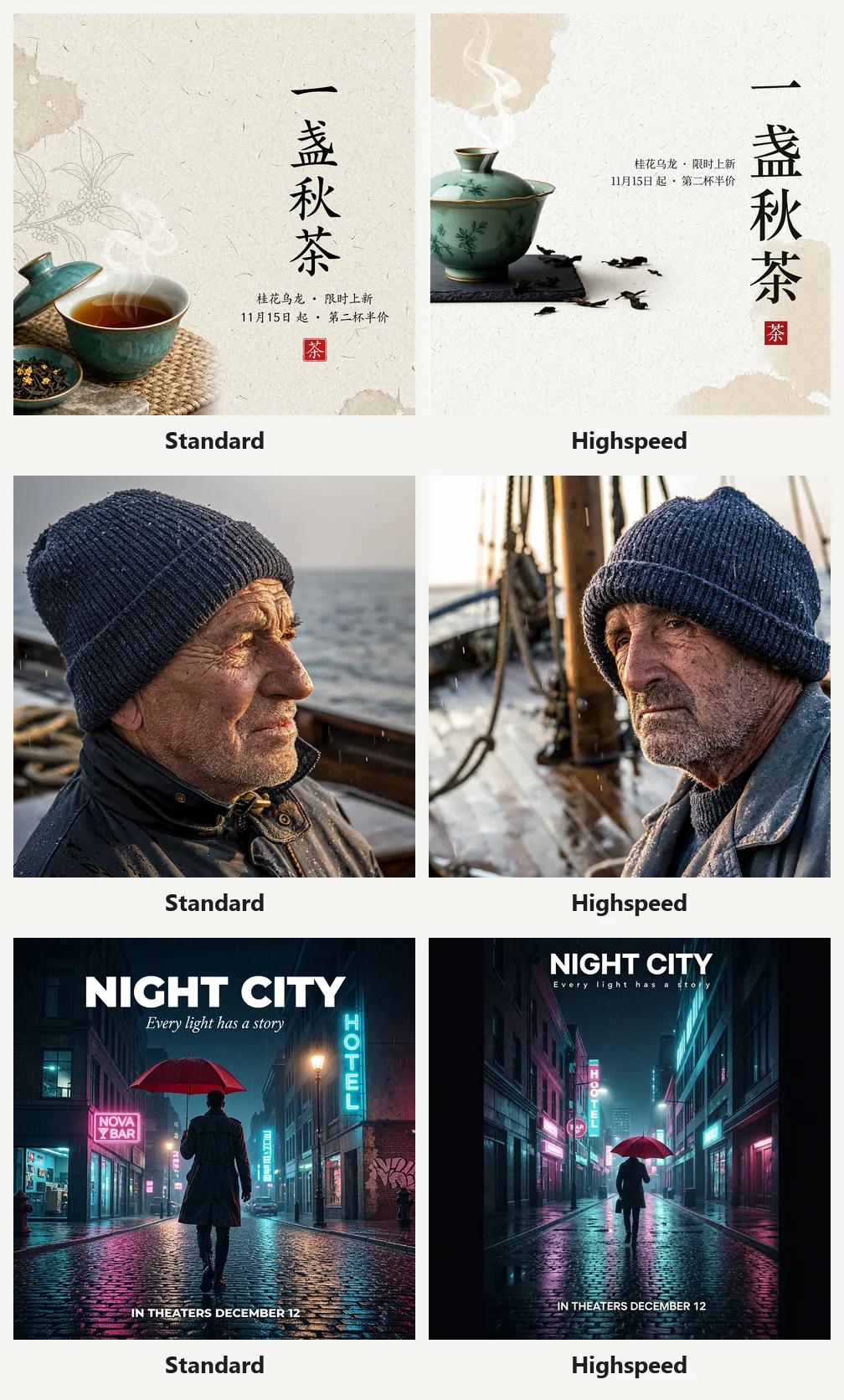
- Use the standard model, not Highspeed. Their images look alike; Highspeed was only about 4 seconds faster on average and costs twice the credits;
- Keep the prompt enhancer on. With it off we saw typos, duplicated objects, gibberish labels and wrong colors;
- Draft at 1K, finish at 2K, save 4K for print. 4K takes only a few seconds longer, but costs 14 credits instead of 5, and a PNG runs over 20 MB;
- Edits and multi-reference images work well, but when you need the exact same face, GPT Image 2.6 is more reliable.
What MiniMax H3 Image can do
| Feature | Details |
|---|---|
| Versions | MiniMax H3 Image (standard), MiniMax H3 Image Highspeed |
| Modes | Text-to-image; edit or combine uploaded images |
| Reference images | Up to 16 |
| Aspect ratios | 13, from 21:9 to 9:21 |
| Resolutions | 1K, 2K, 4K |
| Output formats | PNG, JPEG, WebP (no transparent background option) |
| Prompt enhancer | On by default; can be turned off for text-to-image with a fixed ratio; always on with reference images |
Credits
| Resolution | Standard | Highspeed |
|---|---|---|
| 1K | 4 credits | 8 credits |
| 2K | 5 credits | 8 credits |
| 4K | 14 credits | 26 credits |
These are text-to-image prices. With reference images, the table price is the minimum and the final charge follows the actual generation cost, so more references or a higher resolution can cost slightly more.
Prompt enhancer: on or off?
With the enhancer on, MiniMax first rewrites your prompt into an English description of more than a thousand characters, filling in lighting, materials and composition, then generates from that. Any text you put in quotes, Chinese included, is kept word for word in the rewrite. With it off, the model works from your exact wording.
We ran the same prompts both ways. In every pair, the enhancer-on result was better:
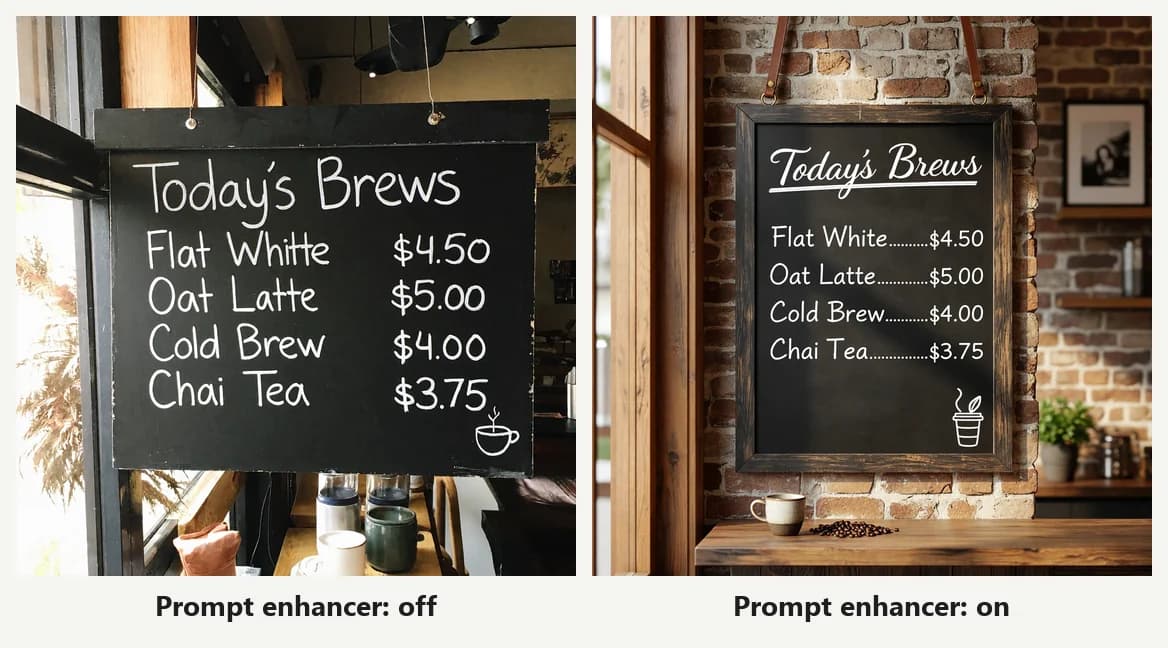
Chalkboard menu: with the enhancer off it wrote "Flat Whitte". With it on, everything was correct, with dotted leaders between items and prices.
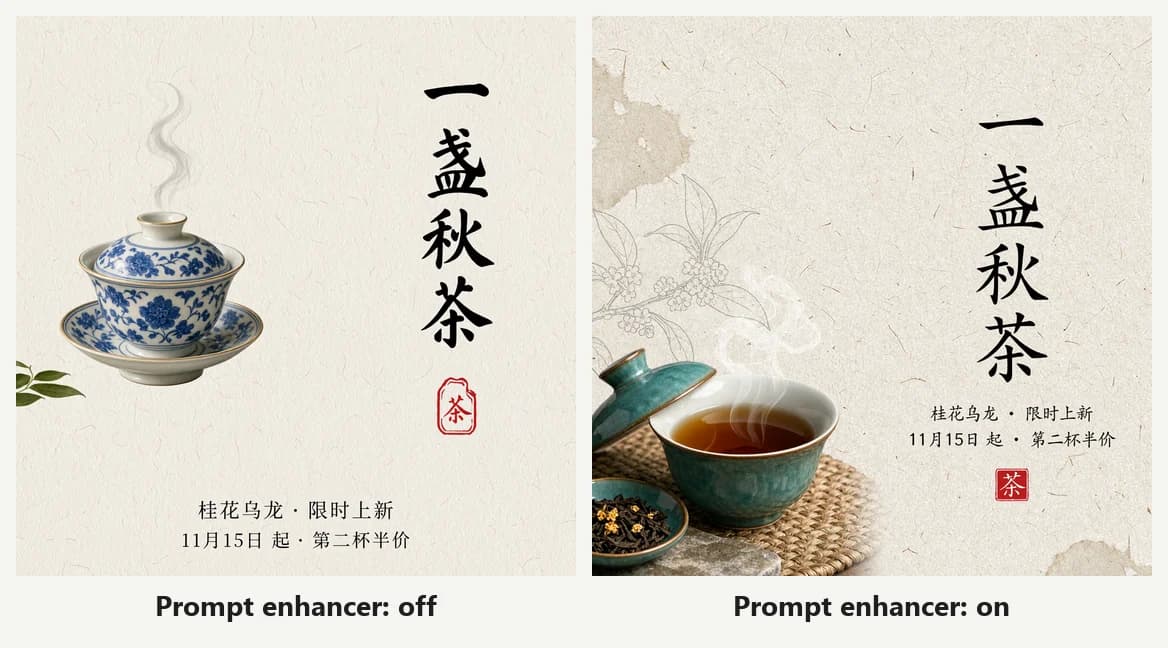
Tea poster: the Chinese text was right both times, but with the enhancer off the cup was blue-and-white porcelain when the prompt asked for celadon. With it on, the color was right and it added a dish of tea leaves and line-drawn branches.
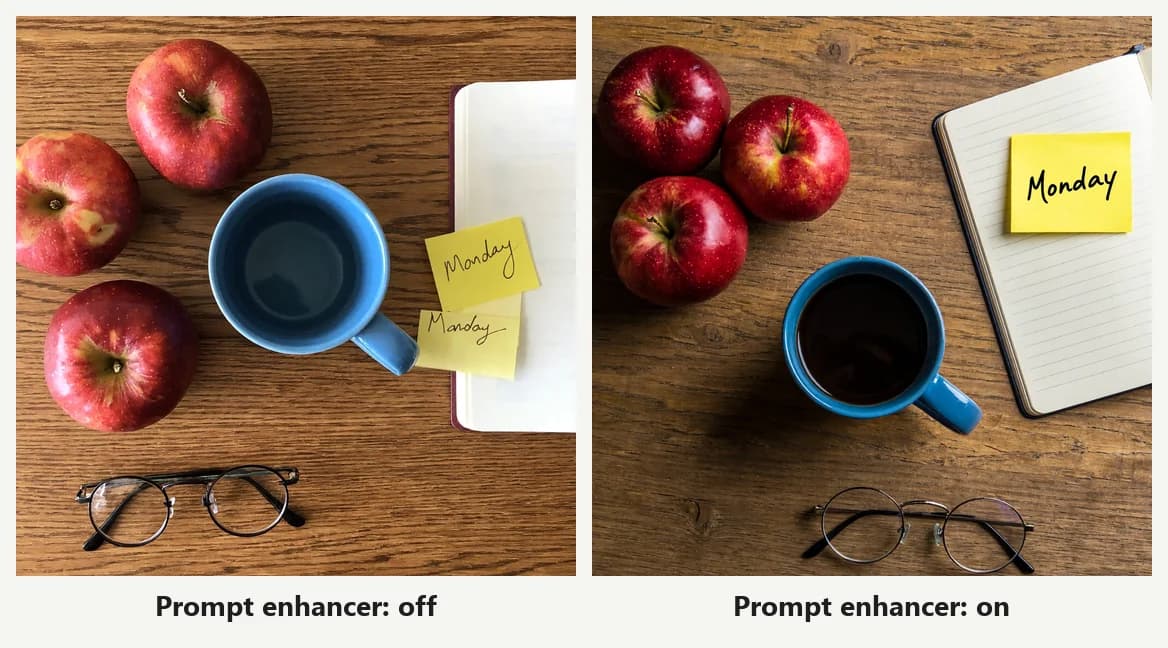
Desk layout: the prompt said "nothing else on the desk", yet with the enhancer off there were two "Monday" sticky notes. With it on, every instruction was followed.
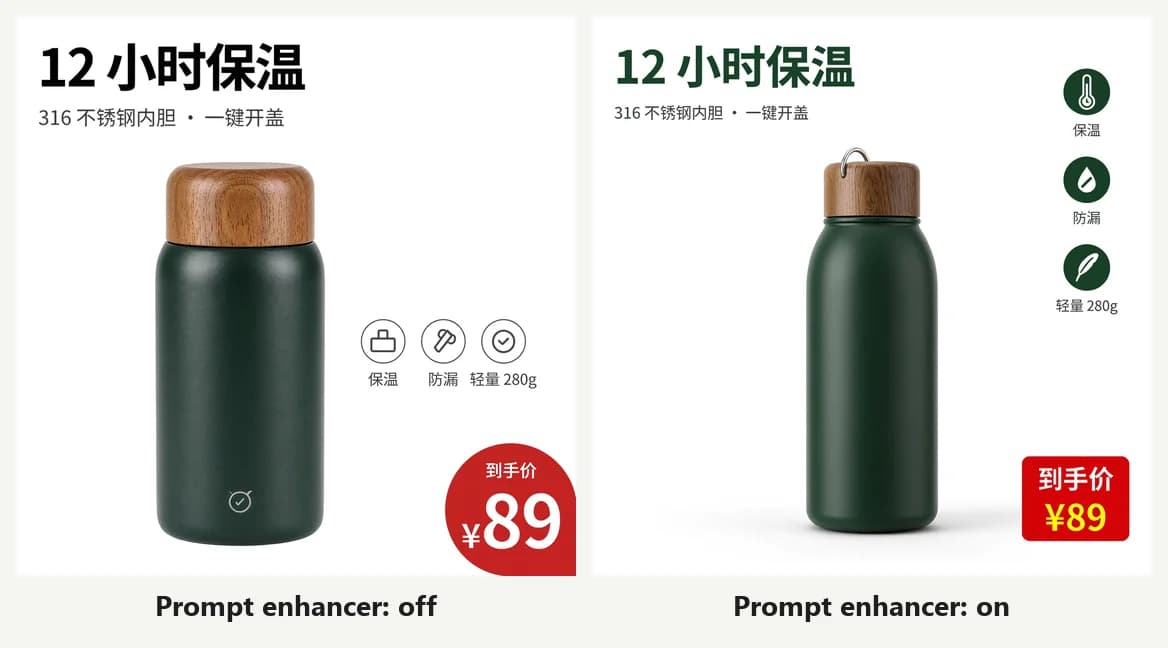
Product image: with the enhancer off, the three icons were squeezed next to the thermos and the price tag was cut off at the right edge. With it on, the icons sat on the right as asked and the price tag was complete.
With the enhancer off we also got a gibberish label on the perfume bottle, and the fisherman stared straight at the camera instead of "slightly off camera".
When should you turn it off? With the enhancer off, images came back about 5 seconds faster (18 s vs 23 s), and the model sticks to exactly what you wrote. That suits a prompt you've already written in great detail and don't want reinterpreted. Otherwise, keep the default.
Standard or Highspeed?
Highspeed is MiniMax's speed-focused version. With the enhancer on, we ran 10 text-to-image prompts through both:
| Standard | Highspeed | |
|---|---|---|
| Avg. time (10 runs) | 22.8 s | 19.0 s |
| Credits at 1K | 4 | 8 |
| Text errors | 0 | 0 |
We saw no clear difference in image quality or text accuracy. Highspeed was just under 4 seconds faster on average, at twice the 1K price. Unless you are generating in bulk and every second counts, the standard model is enough. At 2K the gap shrinks to 3 credits, so if you mostly work at 2K, Highspeed is worth a try.
1K, 2K or 4K?
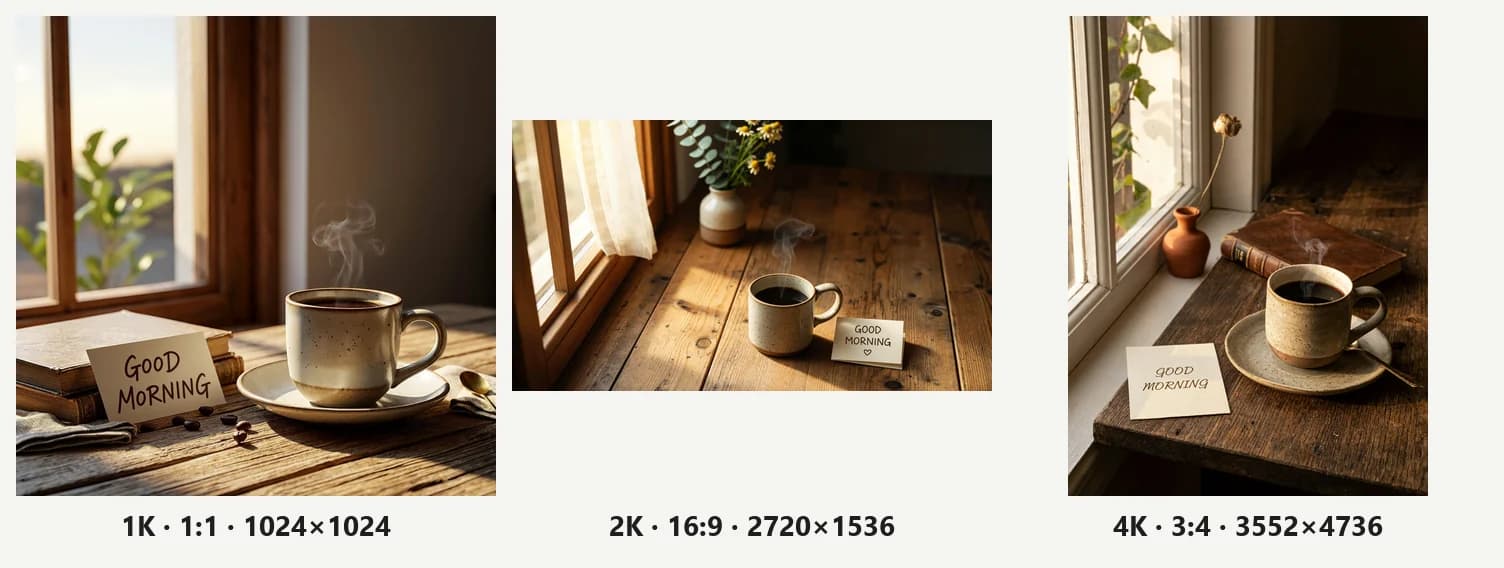
We generated the same prompt (a coffee cup by a window with a "GOOD MORNING" card) on the standard model at all three resolutions:
| Resolution | Ratio | Actual pixels | Time | PNG size | Credits |
|---|---|---|---|---|---|
| 1K | 1:1 | 1024×1024 | 25 s | 1.4 MB | 4 |
| 2K | 16:9 | 2720×1536 | 22 s | 5.5 MB | 5 |
| 4K | 3:4 | 3552×4736 | 28 s | 26 MB | 14 |
A few things stand out:
- Higher resolution isn't necessarily slower. This time 2K finished faster than 1K, and 4K took only a few seconds longer. Queue time matters more;
- 2K costs just 1 credit more than 1K for several times the pixels, the best value of the three;
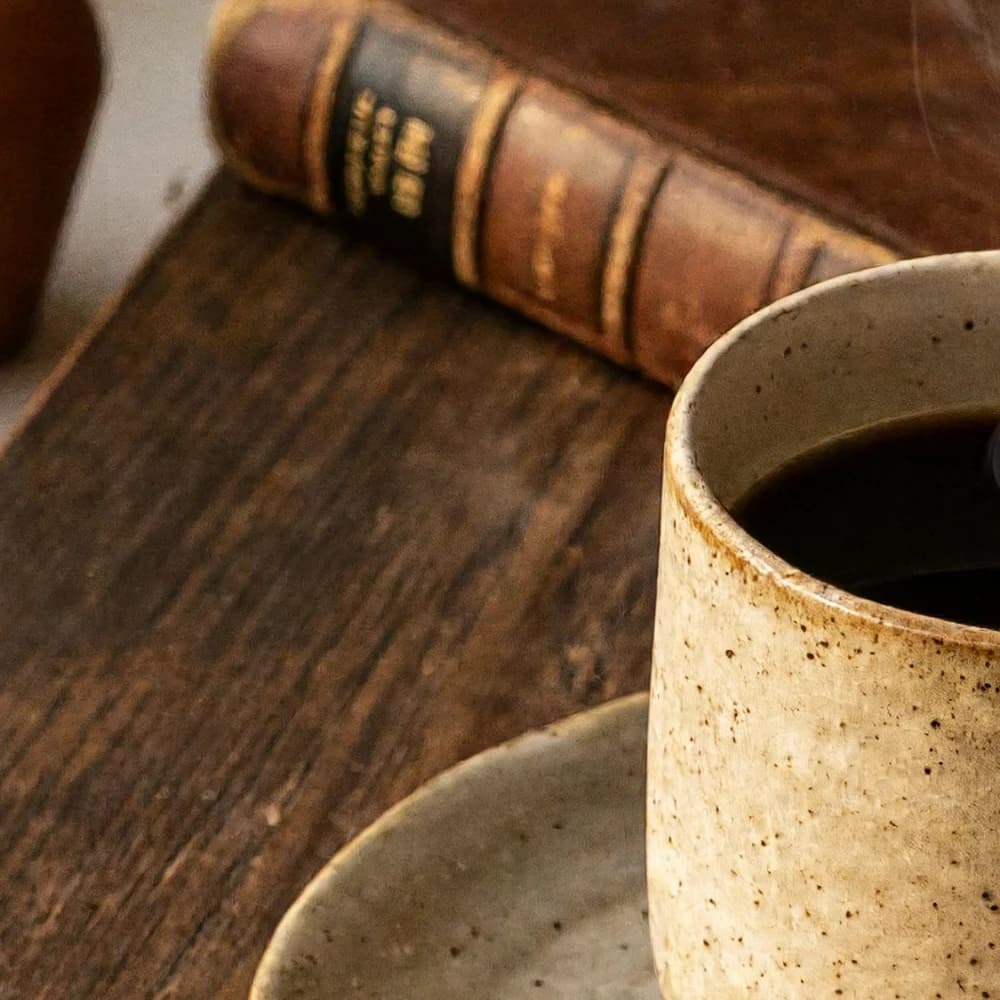
- 4K detail is solid: the speckles on the mug, the wood grain and the book spine are all crisp, good for print and large screens:
- A 4K PNG is 26 MB. If the image is only going on the web or social media, choose JPEG or WebP. Our 2K JPEG was 1.2 MB against 5.5 MB for the PNG.
Edits and multiple reference images
Upload an image and MiniMax H3 changes it the way you describe. We uploaded a 10-frame stop-motion sequence with one line: "Keep the composition, change the season to snowy winter":
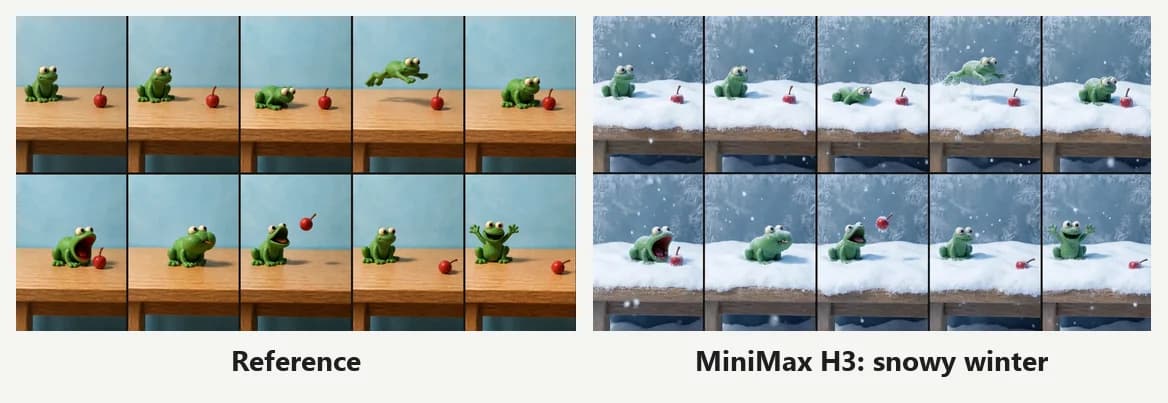
All 10 frog poses, the cherry positions and the grid survived; the table is now under snow and the window is frosted. Without a set ratio, the output follows the reference image's ratio (16:9 here).
With several references, say what each image is for, for example "the woman from image 1, the perfume bottle from image 2":
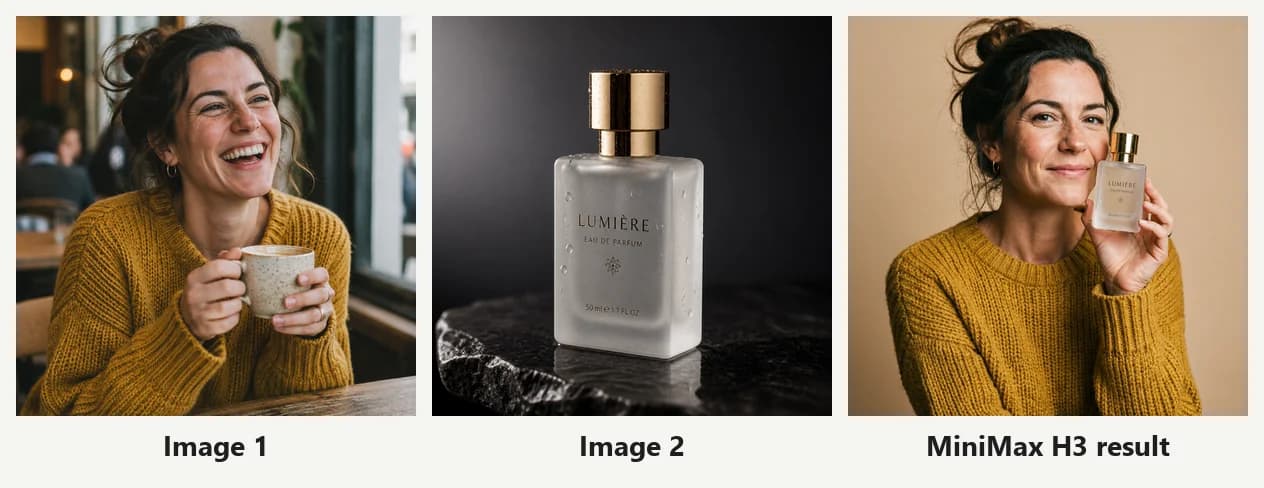
The bottle and its LUMIÈRE label came through unchanged, and the sweater and hair are right, but her face is a little thinner and older than in the reference. MiniMax is a safe choice for product composites; if it has to be the exact same person, use GPT Image 2.6, which kept the face best in our comparison.
Prompt tips
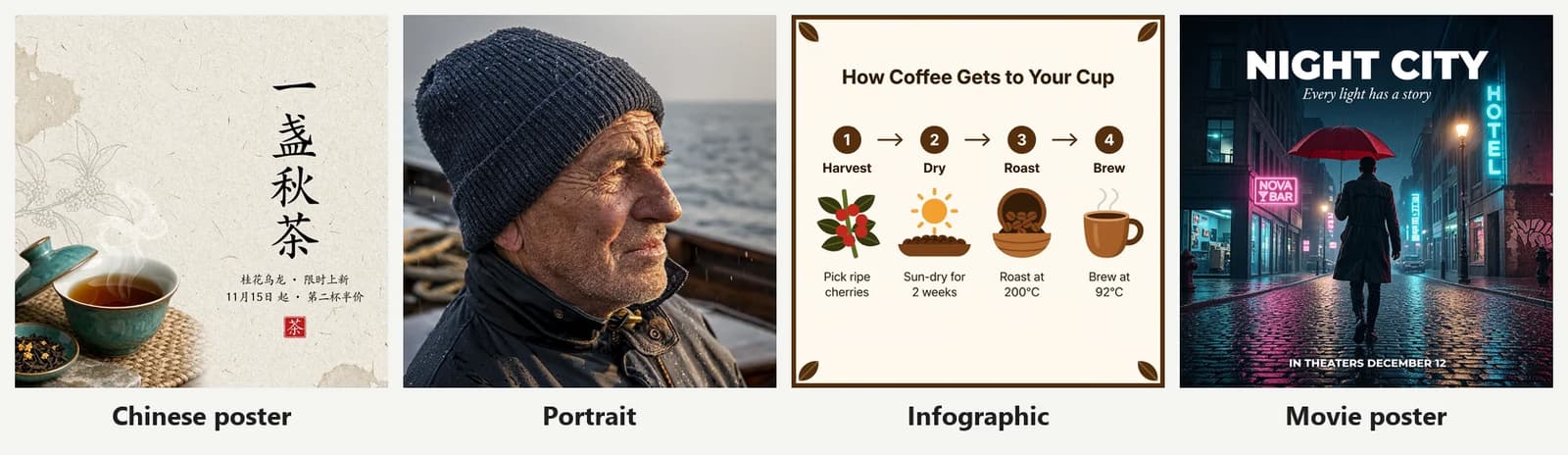
- Put any text you want in the image in quotes, like "NIGHT CITY" or 「12 小时保温」. Across two Chinese and three English text tests, MiniMax with the enhancer on didn't get a single character wrong;
- Be specific about colors and materials. "Tea cup" may get you blue-and-white porcelain; "celadon gaiwan" gets you the cup you meant;
- Don't want an invented brand name on your product? Add "no text or logo on the product";
- When editing, say what must not change, e.g. "keep the bottle's shape, glass and gold cap exactly the same";
- Start at 1K, then rerun the same prompt at 2K or 4K once you like the result.
This movie poster prompt worked first time on MiniMax H3:
A cinematic movie poster of a rainy city street at night, neon signs reflected in puddles, a lone figure with a red umbrella walking away from the camera. Large bold white title at the top: "NIGHT CITY". Under the title, a smaller tagline: "Every light has a story". At the bottom, small text: "IN THEATERS DECEMBER 12". Vertical poster composition inside the frame.So did this Chinese product-image prompt (a green thermos with a headline, three feature icons and a price tag), which you can adapt for your own product:
一张电商主图,白色背景。中间是一只哑光墨绿色的不锈钢保温杯,杯盖是木纹色。左上角大标题「12 小时保温」,下面一行小字「316 不锈钢内胆 · 一键开盖」。右侧三个圆形小图标,图标下分别写着「保温」「防漏」「轻量 280g」。右下角红色价格标签「到手价 ¥89」。排版干净,文字清晰。FAQ
Where can I use MiniMax H3 Image? Open the MiniMax H3 Image page; its generator has the standard model selected. You can also pick it from the model menu in the homepage generator.
Is Highspeed worth it? For most people, no. Across our 10 prompts it was just under 4 seconds faster on average, with similar quality, and it costs about twice as much at 1K and 4K.
Why can't I turn the prompt enhancer off sometimes? MiniMax only allows it for text-to-image with a fixed aspect ratio. When you upload reference images, the enhancer is always on.
Why are 4K images so large? 4K PNG is lossless, so a 3552×4736 image is over 20 MB. For web use, choose JPEG or WebP output and the file gets much smaller.
Is MiniMax H3 better than GPT Image 2.6? They are close: both are accurate with text and cost the same; MiniMax is a little faster, while GPT Image 2.6 keeps faces more consistent. See the full 12-test comparison.
All images in this article were generated on Image2 (image-2.net) on November 13, 2026. Models keep changing, so rerunning these tests later may give different results.