
On YouTube, the thumbnail does more for your click-through rate than the title. A great thumbnail is really three ingredients: a bold, readable headline, a clear subject or reaction face, and high contrast that pops in a crowded feed. GPT-Image-2 can generate all of that from one prompt in about half a minute, in a 16:9 composition ready for a high-resolution export.
This guide uses GPT-Image-2: two proven thumbnail formulas — "the fix" (problem → solution) and before/after comparison — plus the reliable trick for getting the on-image text exactly right.
Why use GPT-Image-2 for thumbnails
- Text, subject, and layout in one shot: headline, reaction face, arrows, and background all come out together — no compositing;
- Built for high CTR: ask for high contrast, thick outlined text, and a clear focal point, and you get the punchy look that performs;
- Fast A/B iteration: reroll two or three variants and pick the strongest — far faster than editing by hand.
The all-purpose thumbnail prompt structure
The reliable pattern is five parts — format + exact size → topic → composition (subject, text position, highlight) → the exact words to spell → punchy style. Open https://image-2.net/ and fill in the skeleton:
Design a high-CTR YouTube thumbnail in a 16:9 aspect ratio, composed for a high-resolution 3840x2160 export.

Topic: (your video in one line)
Composition: (subject position, headline position, a highlight like a red circle/arrow)
Text on image (spell exactly): "YOUR 2-4 WORDS"
Style: punchy YouTube thumbnail, high contrast, saturated colors, thick outlined heavy sans-serif text, strong rim light, clean background. Readable at small size.
Formula A — "The fix" (problem → solution)
The highest-performing pattern for how-to and tech content: a surprised subject + a short punchy claim + an arrow to the key element.
Design a high-CTR YouTube thumbnail in a 16:9 aspect ratio, composed for a high-resolution 3840x2160 export.

Topic: "I FIXED my slow laptop in 5 minutes".
Composition: a surprised person on the right pointing left, a laptop on the left, a bold 3-4 word headline in the upper-left, a bright red circle-and-arrow highlighting the key element.
Text on image (spell exactly): "5 MIN FIX"
Style: punchy YouTube thumbnail, high contrast, saturated colors, thick outlined heavy sans-serif text, strong rim light on the subject, clean uncluttered background. Keep the composition readable at small size.
👉 Use this template: Remix the "fix" thumbnail
Reference template: YouTube Thumbnail — The Fix. Pick 16:9 and the highest resolution available (ideally 4K).
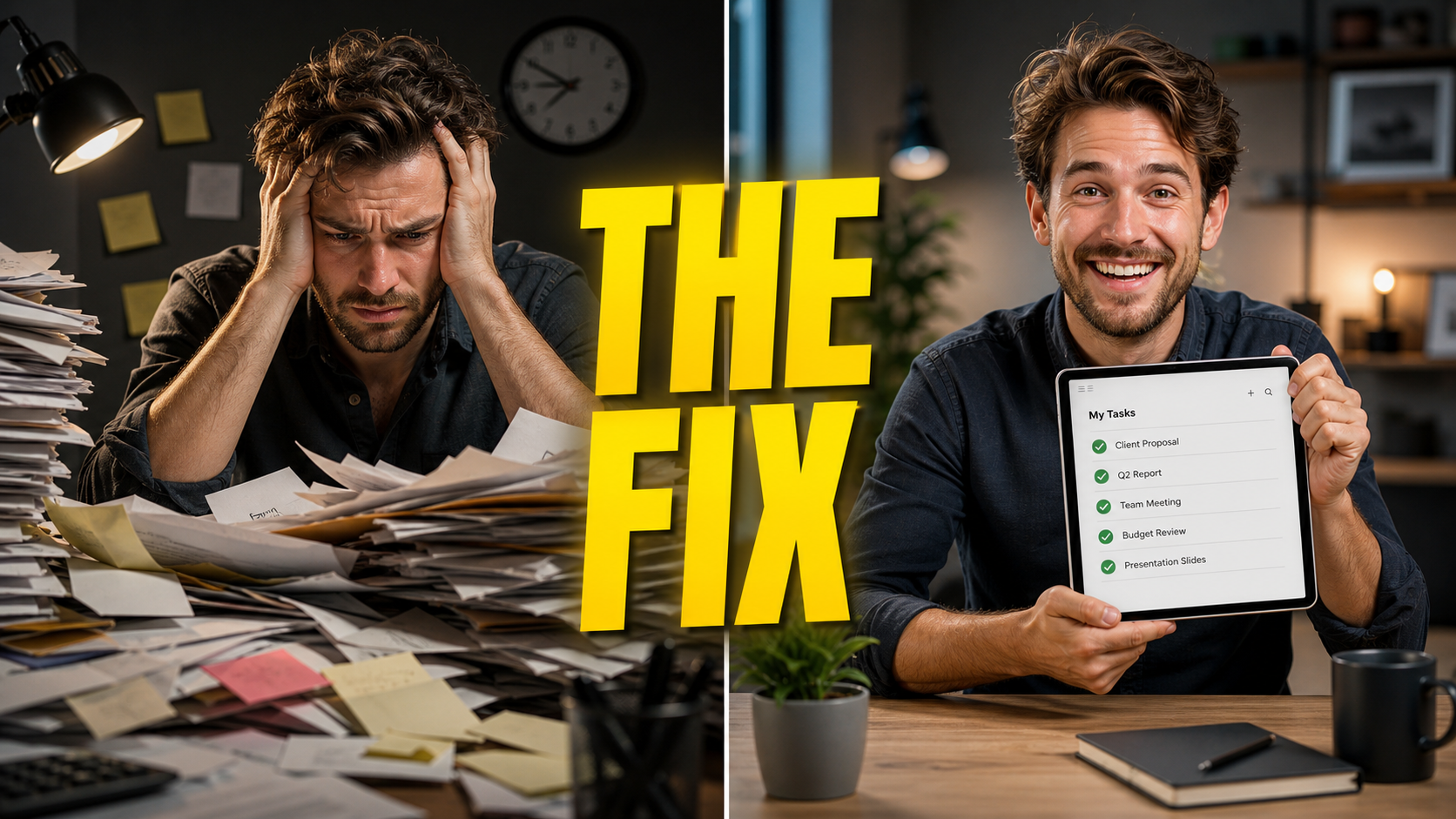
Formula B — Before/after comparison
Perfect for makeovers, transformations, and "old vs new" content: a split composition + BEFORE/AFTER labels + a reaction face on the divider.
Design a high-CTR before/after comparison YouTube thumbnail in a 16:9 aspect ratio, composed for a high-resolution 3840x2160 export.

Topic: a room makeover.
Composition: a vertical split down the middle, left side labeled "BEFORE" (dull, messy), right side labeled "AFTER" (bright, clean), a shocked reaction face overlapping the divider, a bold headline across the top.
Text on image (spell exactly): "BEFORE" and "AFTER"
Style: bold YouTube thumbnail, high saturation, thick outlined text, dramatic contrast between the two halves, arrow or VS badge on the divider.
👉 Use this template: Remix the comparison thumbnail
Reference template: YouTube Thumbnail — Shock Comparison.
The trick for getting the text exactly right
AI still occasionally misspells on-image text. Two reliable fixes:
- Quote it verbatim: put the exact words in quotation marks and add "spell exactly" — as in the prompts above. Keep it short (2–4 words); long text is where errors creep in;
- Second pass with a text tool: if a word still comes out wrong, generate the thumbnail with the background and subject only (skip the headline), then add crisp, perfectly-spelled text with the Text on Image tool. This also gives you exact control over font, color, and position.
For a face-driven "reaction" thumbnail, generating the scene without text and adding it yourself is often the more reliable route — you get a clean subject plus pixel-perfect text.
Export to YouTube's current recommendation
YouTube currently recommends making custom thumbnails as large as possible, ideally 3840×2160 in a 16:9 aspect ratio, with a minimum width of 640 pixels. File-size limits depend on where you upload: 2 MB on mobile for video thumbnails and 50 MB on desktop.
- Keep the largest clean 16:9 source you have: generate at the highest available resolution; if you need an exact 3840×2160 file and the source is already large enough, use the Image Resizer;
- Fix the framing: if the subject sits off-center, trim with the Image Cropper first, then resize;
- Add or tweak text: use Text on Image for a headline the model got wrong, or to A/B different copy on the same image;
- Check the upload limit for your device: keep video thumbnails under 2 MB on mobile or 50 MB on desktop.
Generate another, or use "Use as reference" for fixes
- Composition too busy? Click Generate another to reroll;
- Text misspelled? Click Use as reference and add "fix the text to read exactly 'YOUR WORDS'", or do the Text on Image second pass;
- Want a different reaction or color? Click Use as reference and add the change to the prompt.
Tip: always check the thumbnail at small size — shrink it in preview. If the text isn't instantly readable at feed size, make it bigger and bolder. That single check is worth more than any styling.
Wrap-up
A click-worthy thumbnail comes down to three things:
- On image-2.net, use a proven formula — "the fix" or before/after — with a high-resolution 16:9, high-contrast prompt;
- Get the text right with verbatim quotes, or a Text on Image second pass;
- Keep the largest clean 16:9 export available, ideally 3840×2160, and verify the upload limit for your device.
Save the formula that fits your channel, swap the topic and headline each time, and you can test several thumbnails per video in minutes.