
The AI Halloween trend is simple: upload a normal selfie, paste a prompt, and get back a photo of yourself in a costume you never had to buy. The hard part is the prompt. Type "make me a witch for Halloween" into Gemini or ChatGPT and you often get a stranger in a generic hat.
This post collects 8 Halloween prompts that keep the face. Every prompt below is the exact text behind one of the presets on the AI Halloween Costume Generator, and every one comes with the original photo next to the result, so you can see what it actually does before you spend a generation on it.
You can paste these prompts into Gemini, ChatGPT or any image editor that accepts a reference photo. Results differ from model to model. If you'd rather skip the copy-paste, each section has a one-click link that loads the prompt into the Image2 generator.
The 8 prompts at a glance
| # | Look | Works for | Prompt page |
|---|---|---|---|
| 1 | Gothic plum-violet braids, velvet coat, moonlit garden | One person | Midnight Braids |
| 2 | Midnight-blue star gown, moon crown, observatory | One person | Cosmic Princess |
| 3 | Wearable robot armor with blue LEDs | One person | Robot Costume |
| 4 | Worn unicorn mascot suit, foggy fairground | One person | Haunted Unicorn Mascot |
| 5 | Mossy hooded cloak and lantern, misty forest | One person | Forest Witch |
| 6 | Original sci-fi hero suit, nebula backdrop | One person | Galactic Hero |
| 7 | Pumpkin costume for a dog or cat | One pet | Pumpkin Pet |
| 8 | Cowboy and angel matching costumes | Two people | Cowboy and Angel Couple |
All eight also live together in the Halloween prompt category.
Why most Halloween prompts lose your face
A short prompt gives the model one instruction ("Halloween costume") and no limits. So it changes everything it can: face, age, body, background, sometimes the number of people. The prompts in this post fix that with the same five-part structure:
- What to keep. Open with the face: "same facial features, face shape, skin tone and age". The model weighs early instructions heavily, so identity goes first.
- What to change. Name the hairstyle and costume with colors and materials ("long plum-violet braids", "black velvet coat with purple lace trim"). Vague words like "spooky outfit" leave too much to chance.
- The scene. One place plus two or three concrete details: "a foggy fairground at night with an empty carousel and one flickering spotlight".
- The photography. Ask for a photorealistic portrait and name the light, for example "cool moonlight with warm lantern rim light". Lighting is what makes an edit look like a real photo instead of a sticker.
- What to avoid. Close with limits: same number of people, no identity change, no extra limbs, no text or watermarks. For any costume with a mask or helmet, add "do not cover the face".
Once you see the pattern, you can swap any single part (a different costume, a different scene) and keep the rest.
How to use these prompts
On Image2: open the AI Halloween Costume Generator, upload your photo, then click a preset or paste a prompt and generate. GPT Image 2.5 Flare is selected by default there; the generator shows the credit cost before you start.
In Gemini or ChatGPT: start a new chat, attach your photo, paste the prompt and send. If the face drifts, reply with "keep the face from the original photo exactly the same" and try again.
Which photo to use: a clear, front-facing, well-lit photo with nothing covering the face. Sunglasses, hats and heavy shadows make it harder for any model to keep the likeness.
Halloween selfie prompts
The first six prompts take one photo of one person. The example results were made with GPT Image 2.5 Sunburst at 1K from the selfies shown on the left.
1. Midnight Braids gothic portrait
A full hair change plus a velvet coat and a moonlit garden. It's the most dramatic of the set, because the prompt rebuilds the hairstyle instead of just adding a costume.
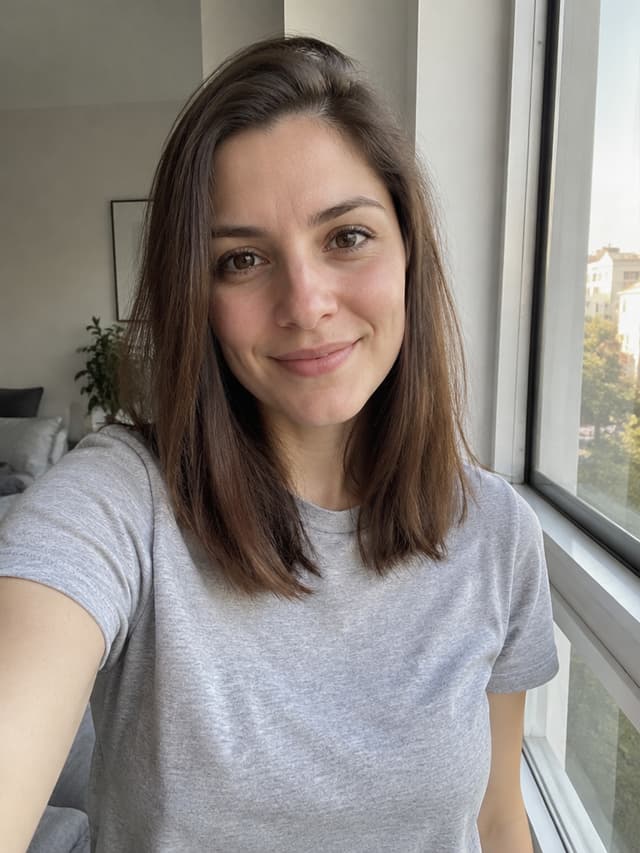
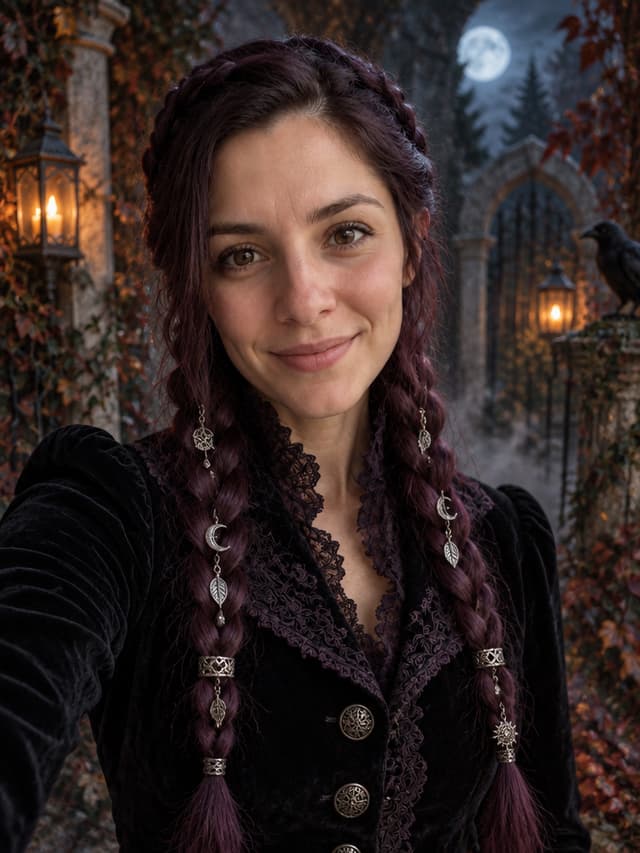
Edit the uploaded photo into a gothic Halloween fashion portrait.

Keep the person's face recognizable: same facial features, face shape, skin tone, approximate age and natural body proportions.

Replace the hairstyle completely: braid all of the hair into two long, thick plum-violet braids that hang over the front of the shoulders down to the chest, clearly visible, with small silver charms woven in. No loose or straight hair. Dress the person in a fitted black velvet coat with deep purple lace trim and antique silver buttons.

Place the person in a moonlit overgrown garden with stone arches, low drifting fog, wrought-iron lanterns and dark autumn leaves.

Photorealistic editorial portrait, 85mm lens look, cool moonlight with warm lantern rim light, realistic velvet and lace texture, natural skin detail.

Keep the same number of people as the uploaded photo. Do not change the person's identity. No extra limbs, distorted hands, text, logos or watermarks.
👉 Try it: Load the Midnight Braids prompt · Prompt page
Why it works: "No loose or straight hair" stops the model from keeping your old hairstyle and just adding thin braids on top. If your hair is very short, the braids may look added rather than grown; that's normal.
2. Cosmic Princess
A star-embroidered gown, a crescent-moon crown and an old observatory. A good pick if you want something pretty rather than scary.
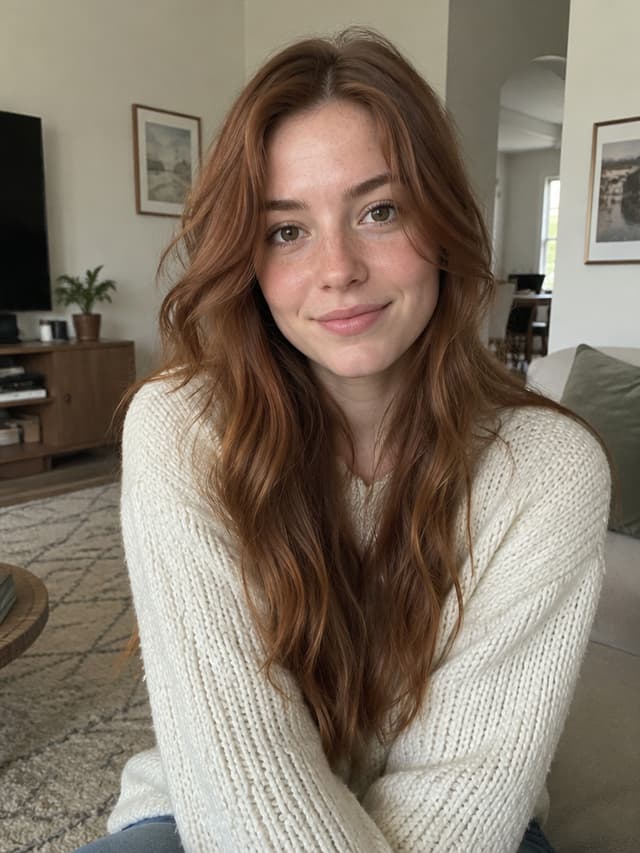
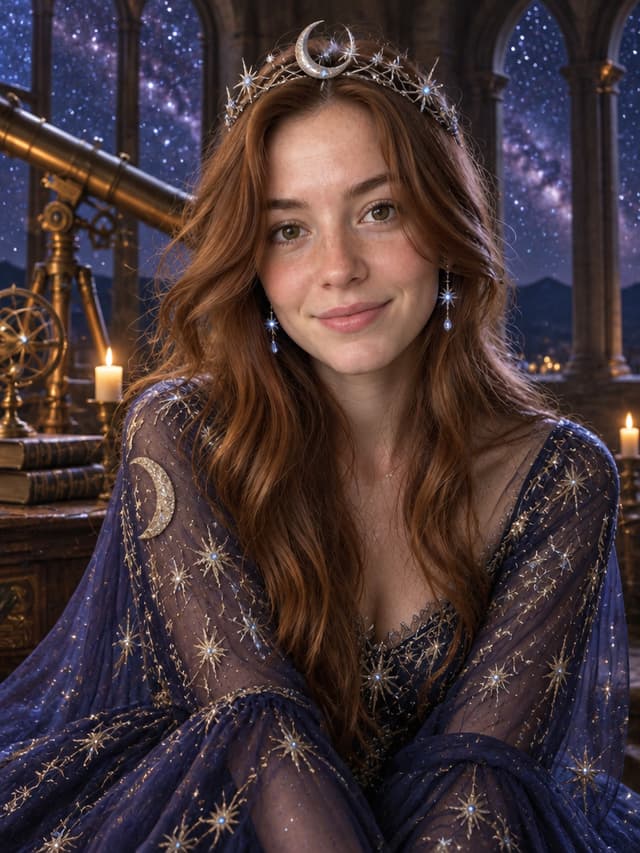
Edit the uploaded photo into a celestial Halloween princess portrait.

Keep the person's face recognizable: same facial features, skin texture, body proportions and pose.

Replace the outfit with a flowing midnight-blue gown embroidered with silver thread and softly glowing star patterns. Add a delicate silver crescent-moon crown and small luminous earrings.

Place the person inside an old observatory at night, with a brass telescope and a starry sky visible through tall arched windows.

Fantasy fashion photography, realistic fabric folds, cinematic rim light, deep blue, silver and violet color palette.

Keep the same number of people as the uploaded photo. Do not change the person's identity. No extra people, distorted anatomy, text or watermarks.
👉 Try it: Load the Cosmic Princess prompt · Prompt page
Why it works: the color palette line (deep blue, silver, violet) keeps the gown, crown and background matched. Swap the three colors to restyle the whole image, for example emerald, gold and black.
3. Robot Costume
Armor panels, LED strips and a hazy studio. The key line is "a well-made costume worn by a real person", which keeps you human instead of turning you into a machine.

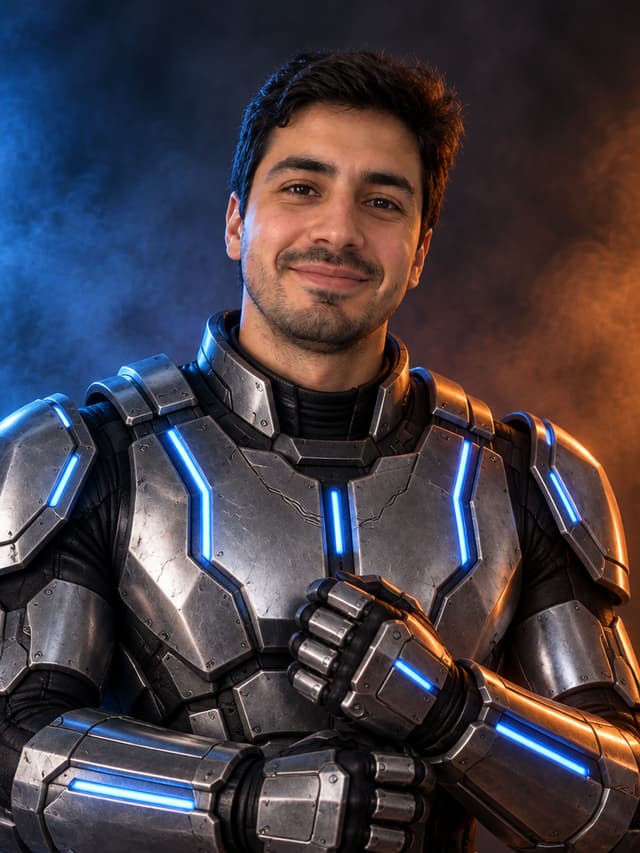
Edit the uploaded photo into a futuristic Halloween robot costume portrait.

Keep the person's face recognizable and fully visible: same facial features, skin tone, head shape and original pose.

Dress the person in a wearable robot costume: brushed-metal-look armor panels, articulated shoulder pieces, a chest plate with thin blue LED strips and matching gauntlets. It must look like a well-made costume worn by a real person, not a new mechanical character.

Dark studio backdrop with light haze.

Photorealistic studio portrait, dramatic blue and orange cinematic lighting, realistic reflections on the armor.

Do not replace the face with a robot head or helmet. Keep the same number of people as the uploaded photo. No extra limbs, duplicated body parts, logos or text.
👉 Try it: Load the Robot Costume prompt · Prompt page
Why it works: "Do not replace the face with a robot head or helmet" matters more than it looks. Without it, models often decide a robot should have a metal face.
4. Haunted Unicorn Mascot
An original creepy-cute mascot suit: matted plush, a stitched horn and a foggy, empty fairground. Spooky without any gore, so it's fine to share anywhere.
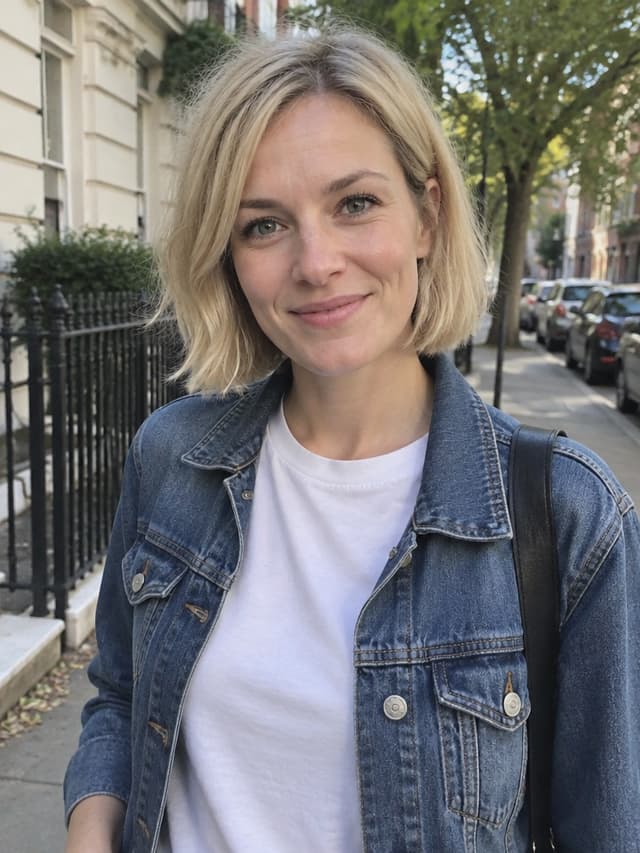
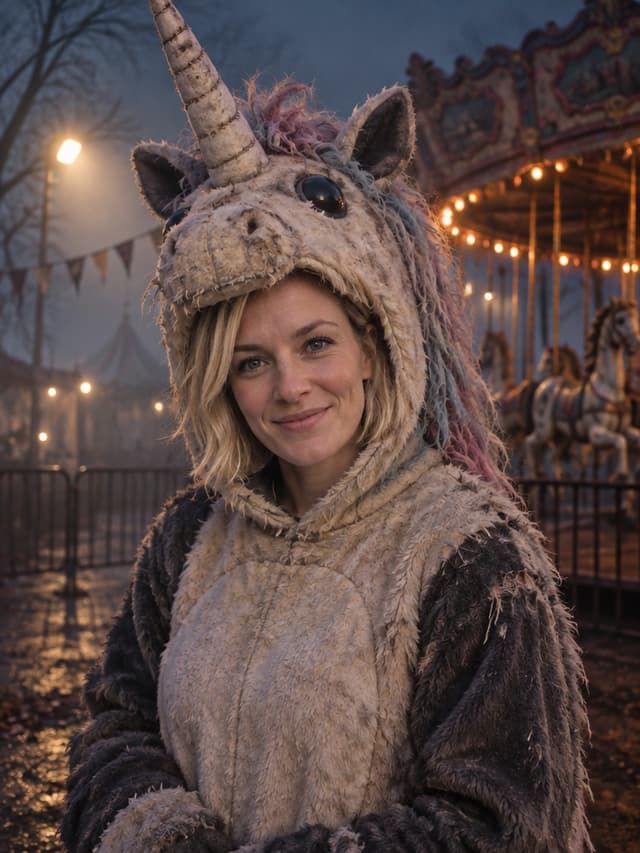
Edit the uploaded photo into an original haunted unicorn mascot Halloween portrait.

Keep the person's face recognizable: same facial features, face shape, skin tone and natural proportions. The face stays visible through the open front of the mascot hood.

Dress the person in a worn plush unicorn mascot suit in faded cream and charcoal: slightly matted fur, a stitched fabric horn, a tangled pastel mane and a few frayed seams.

Place the person beside an empty carousel in a foggy fairground at night, with one flickering spotlight, faded bunting and bare trees.

Cinematic photorealistic photography, cold blue and sodium-orange practical lights, heavy fog, shallow depth of field, subtle film grain. Eerie mood without gore.

Keep the same number of people as the uploaded photo. Do not change the person's identity. No blood, gore, extra limbs, distorted hands, text, logos or watermarks.
👉 Try it: Load the Haunted Unicorn prompt · Prompt page
Why it works: "The face stays visible through the open front of the mascot hood" solves the usual mascot problem, where the costume head swallows the person. The "eerie mood without gore" line keeps the horror on the safe side.
5. Forest Witch
A mossy hooded cloak, an herb pouch and a lantern in a misty autumn forest. The classic witch, but grounded in real materials instead of a costume-shop hat.
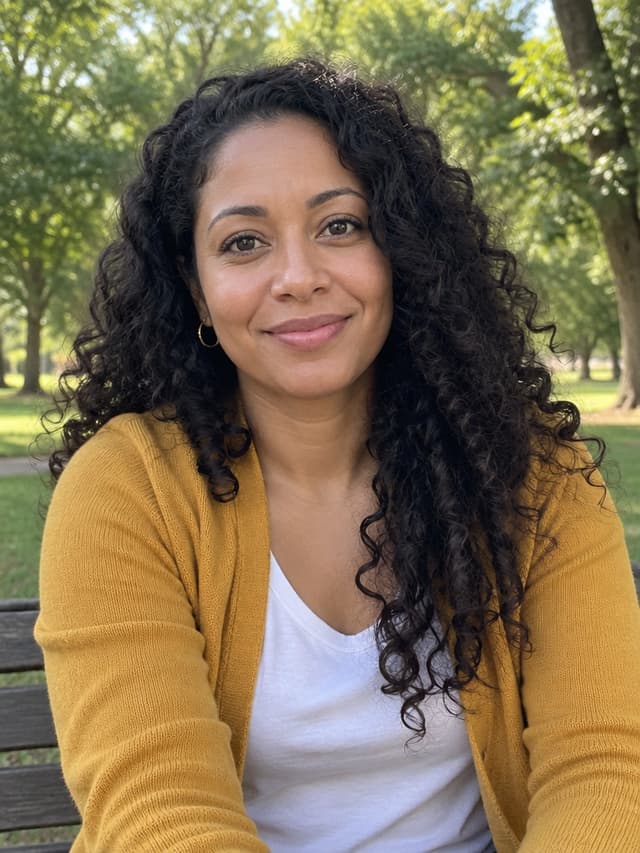
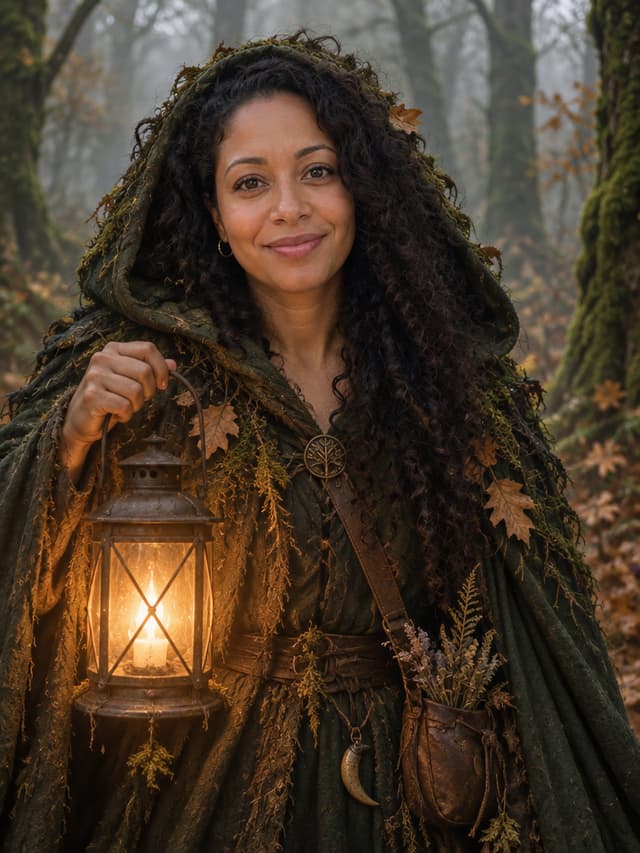
Edit the uploaded photo into a forest witch Halloween portrait.

Keep the person's face recognizable: same facial features, face shape, skin tone, approximate age and natural proportions.

Dress the person in a weathered dark-green hooded cloak layered with moss, dried leaves and leather straps, with a small herb pouch at the waist. The person holds a warm glowing lantern close to the body.

Place the person in a misty autumn forest with moss-covered trunks, hanging fog and fallen leaves.

Photorealistic editorial portrait, warm lantern key light against cool green ambient light, realistic fabric and moss texture, natural skin detail.

Keep the same number of people as the uploaded photo. Do not change the person's identity. No extra limbs, distorted hands, text, logos or watermarks.
👉 Try it: Load the Forest Witch prompt · Prompt page
Why it works: the lantern is both a prop and the main light source ("warm lantern key light"), so the face gets a warm glow against the cool green forest. Prefer a pointed hat? Add it to the costume sentence and keep everything else.
6. Galactic Hero
An original armored suit with glowing cyan seams and a visor pushed up on the forehead, set against a nebula.
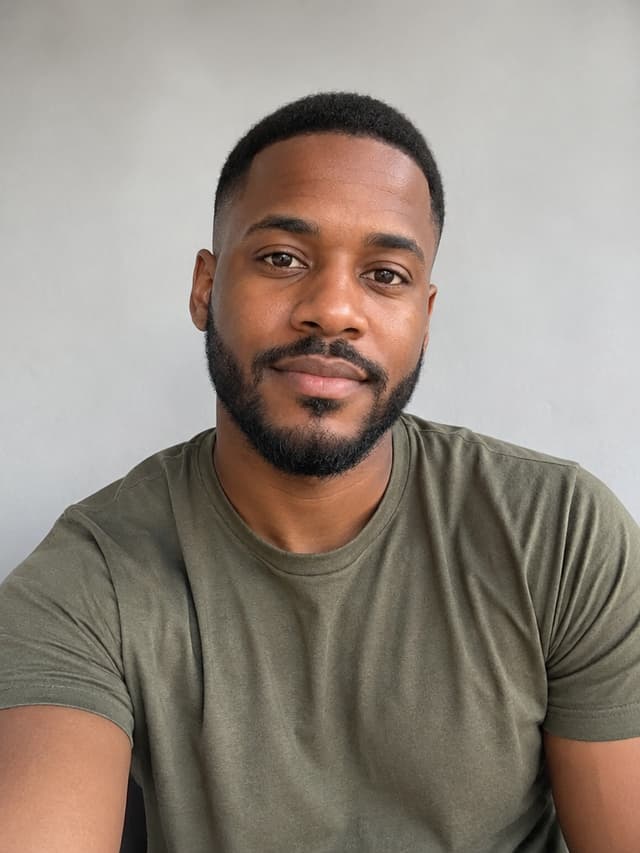
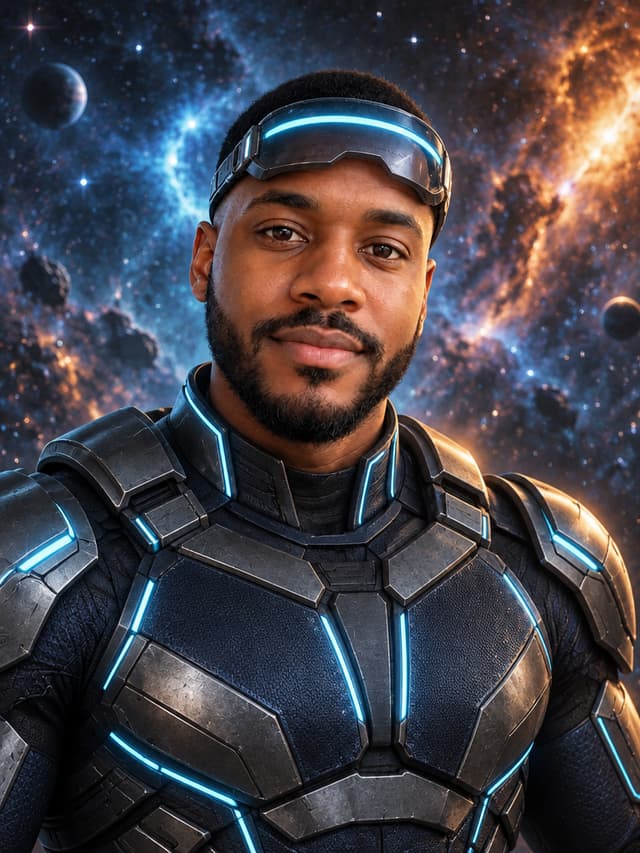
Edit the uploaded photo into an original sci-fi superhero Halloween portrait.

Keep the person's face recognizable and visible: same facial features, face shape, skin tone and natural proportions.

Dress the person in a fitted armored bodysuit in gunmetal and dark navy with thin glowing cyan seams. Add a sleek visor with a cyan light band, worn pushed up on the forehead so the eyes stay visible. The design must be original and must not copy any existing comic or film costume.

Place the person against a deep-space nebula with scattered stars.

Photorealistic studio portrait, cinematic rim light, realistic material reflections, high detail.

Keep the same number of people as the uploaded photo. Do not change the person's identity. No logos, emblems, text, extra limbs or distorted hands.
👉 Try it: Load the Galactic Hero prompt · Prompt page
Why it works: "worn pushed up on the forehead so the eyes stay visible" keeps the visor from hiding your face. The line about not copying any existing costume keeps the design original, which also makes the photo safer to post.
AI Halloween pet prompt
7. Pumpkin Pet
Your dog or cat in a soft pumpkin costume in a warm autumn studio.
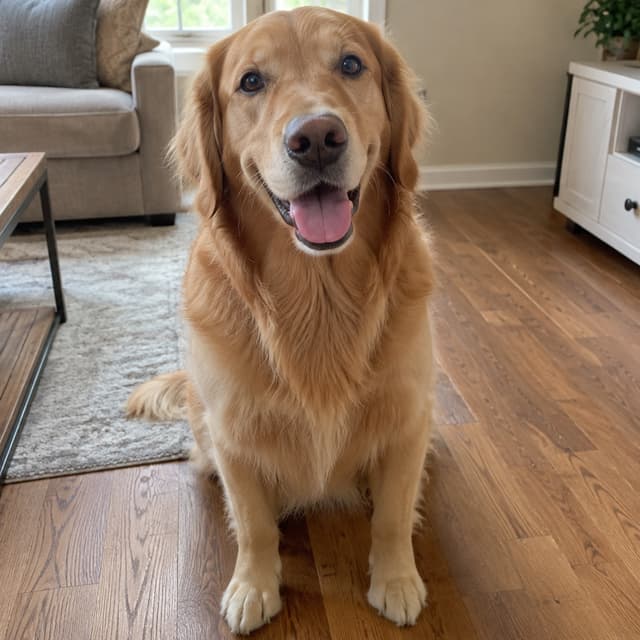
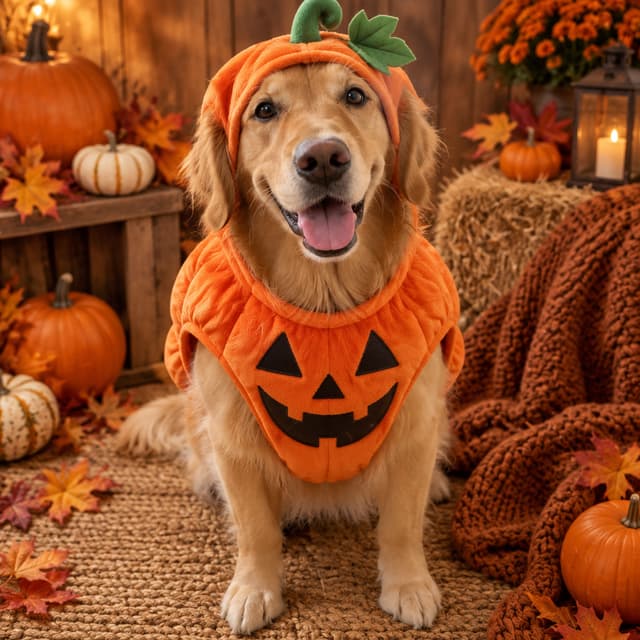
Edit the uploaded pet photo into a Halloween pet portrait.

Keep the animal exactly as it is: same species, breed, fur color, markings, eye color, face and natural anatomy.

Dress the pet in a soft orange pumpkin costume with a small green stem and leaf on top. The costume fits naturally and does not cover the eyes.

Place the pet in a cozy autumn photo studio with warm light, mini pumpkins, dried leaves and a knitted blanket.

Photorealistic professional pet portrait, realistic fur texture, soft natural shadows.

Keep the same number of animals as the uploaded photo. No extra animals, extra paws, duplicated limbs, text or watermarks.
👉 Try it: Load the Pumpkin Pet prompt · Prompt page
Why it works: pets have no "face shape" a model can hold on to, so the keep-list names breed, fur color, markings and eye color instead. Use a photo where the whole animal is in frame and in focus; a blurry mid-zoomie shot gives the model too little to copy.
AI Halloween couple prompt
8. Cowboy and Angel
A matching couple look at a rustic barn at golden hour. Upload one photo of both of you, or one photo of each person.
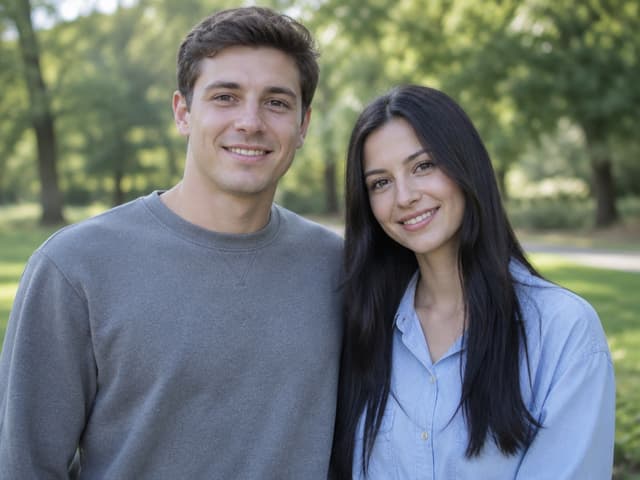
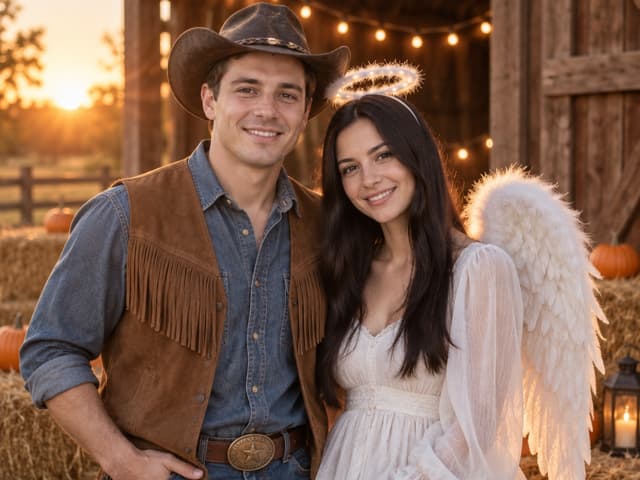
Edit the uploaded photo(s) into a Halloween couple portrait. If two photos are uploaded, the person in image 1 is the cowboy and the person in image 2 is the angel. If one photo shows both people, the person on the left is the cowboy.

Keep both faces recognizable: each person keeps their own facial features, face shape, skin tone, age and body proportions. Do not swap or blend their faces.

Cowboy: worn brown leather hat, denim shirt, suede fringe vest, belt with a brass buckle. Angel: flowing white dress, soft feathered wings and a subtle glowing halo.

Both stand close together at a rustic barn at golden hour, with hay bales, string lights and a few pumpkins.

Photorealistic couple portrait, warm golden-hour backlight, realistic fabric and feather texture, natural skin detail.

Exactly two people in the image. No extra people, distorted hands, text, logos or watermarks.
👉 Try it: Load the Cowboy and Angel prompt · Prompt page
Why it works: two-person edits often swap or blend faces. The first line assigns each costume to a specific person (image 1 or the person on the left), and "Do not swap or blend their faces" backs it up. To flip the roles, just swap "cowboy" and "angel" in that first sentence.
Write your own Halloween prompt
Want a costume that isn't in the list? Fill in this skeleton. It follows the same five parts as every prompt above:
Edit the uploaded photo into a [theme] Halloween portrait.

Keep the person's face recognizable: same facial features, face shape, skin tone, approximate age and natural proportions.

[Hairstyle change, if any.] Dress the person in [costume with 2-3 colors and materials].

Place the person in [location] with [2-3 concrete details].

Photorealistic portrait, [type of light], realistic [fabric/material] texture, natural skin detail.

Keep the same number of people as the uploaded photo. Do not change the person's identity. No extra limbs, distorted hands, text, logos or watermarks.
A few rules that save rerolls:
- Describe a costume, not a character. "A vampire in a high-collared burgundy cape" works better, and is safer to post, than naming a movie character.
- One scene, not three. "A foggy graveyard at night" beats "a graveyard, a haunted house and a pumpkin patch".
- Change one thing per retry. If the result is close, edit only the part that's wrong (usually the costume or the light) so you can tell what helped.
Which model should you use?
The prompts are plain English, so they run on any image model that edits photos. On Image2 you can pick between five models in the same generator:
- GPT Image 2.5 Flare is the default on the Halloween generator. It's the fastest for photo edits and is billed on actual cost, about 4.5 credits on average for a 1K edit.
- GPT Image 2.5 Sunburst made all the example images in this post.
- Nano Banana 2.1, Google's Gemini image model, costs a fixed 4 credits at 1K. If you came here looking for Gemini Halloween prompts, this is the Gemini model to pick.
- GPT Image 2 and Nano Banana Pro are also in the model menu.
Try the same photo and prompt on two models and keep the one you like; your history shows which model made each image.
What it costs
New accounts get free trial credits, enough for a first 1K photo. If you want to try several looks, the Halloween Pack is a one-time $4.99 for 300 credits, valid for 90 days, with no subscription. At the default model's average cost that's roughly 65 photos at 1K. See the pricing section on the Halloween page for details.
FAQ
Do these prompts work in Gemini?
Yes. Attach your photo in Gemini, paste the prompt and send. They are written as plain instructions with no special syntax, so they also work in ChatGPT and other photo editors. Results vary between models; the before/after images in this post were made with GPT Image 2.5 Sunburst on Image2.
Will the result still look like me?
Each prompt starts by telling the model what to keep and ends by forbidding identity changes, which helps a lot. A clear, front-facing, well-lit photo still matters most. If the face drifts, regenerate or add one more line asking to keep the face from the original photo.
Can I use these for a group photo?
The selfie prompts include "keep the same number of people as the uploaded photo", so they can handle a group shot, but every person gets the same costume and faces are harder to keep. For two people, the Cowboy and Angel prompt is built for that.
What size should I pick for Instagram or TikTok?
Choose 4:5 for a feed post or 9:16 for Stories, Reels and TikTok in the generator's ratio menu before you generate.
Start with one photo
Pick the look you like, open the AI Halloween Costume Generator, upload a clear photo and generate. Every prompt here stays public on its prompt page, and you can browse all of them in the Halloween category. Happy Halloween.