
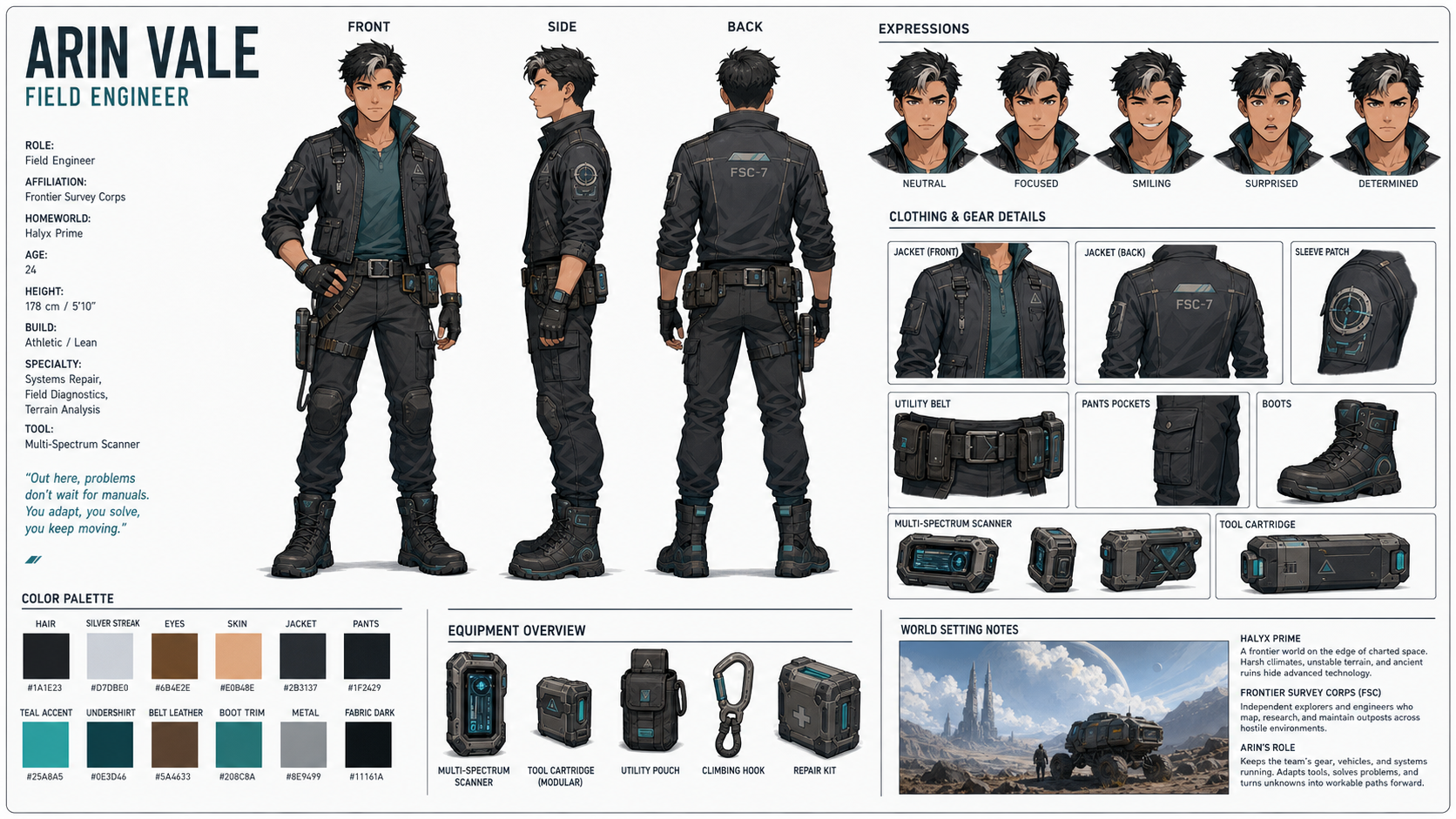
The hardest part of any recurring character — a mascot, a game hero, a comic lead — isn't the first drawing. It's keeping that character looking like the same person across every new pose, expression, and scene. The professional answer is a character reference sheet (model sheet): one page that pins down the turnaround, expressions, outfit, and palette, so everyone (and every later generation) draws from the same source of truth.
This guide uses GPT-Image-2 to generate a full reference sheet from a single prompt, then reuse it to stay on-model. No drawing skills required.
Why a reference sheet comes first
- It's your anchor: once you have front/side/back views and a fixed palette, every later image has something concrete to match;
- It solves consistency at the source: if you plan a multi-panel storyboard, a reference sheet is the anchor image that keeps the character on-model across all panels;
- It's reusable forever: save the sheet and the prompt, and you can spin off new poses, merch, or scenes without redesigning the character.
The all-purpose "model sheet" prompt structure
The reliable pattern is four parts — a detailed character description → the required views (turnaround) → the expression row and callouts → "keep every view consistent." Open https://image-2.net/ and fill in the skeleton:
Create a character reference sheet on a single page, clean background, with labeled sections.

Character: (one paragraph — who they are, build, hair, signature outfit, palette, one-word personality)
Include: a full-body turnaround (front, 3/4, side, back), a row of expressions, outfit/prop callouts, and a color palette bar.
Keep the exact same face, proportions, outfit, and colors across every view. Do not crop any view.
The directions below all reuse this skeleton and just swap the art style.
Direction A — Official / photoreal model sheet
The all-purpose default: clean, neutral, production-ready. Emphasize consistent proportions across views and thin caption labels.
Create a professional character reference sheet (model sheet) on a single page, clean neutral background, with labeled sections.

Character: (one paragraph — species/person, age, build, hairstyle, signature outfit, palette, personality in one word)

The sheet must include:

- A full-body turnaround: front, 3/4, side, and back views, all the same height and proportions;
- A row of 5 head expressions: neutral, happy, angry, surprised, sad;
- Two or three outfit or prop callouts with small labels;
- A small color-swatch palette bar.

Style: clean official character design sheet, consistent proportions across all views, soft even lighting, thin caption labels, do not crop any view.
👉 Use this template: Remix the official reference sheet
Reference template: Official Character Reference Sheet. Pick 16:9 and 2K so the small labels stay legible.
Direction B — Stylized / animation character
For a mascot or animated short, the key is a friendly, unified style plus locked face, outfit, and colors across views.
Create a colorful 3D-animation character reference sheet on a single page.

Character: a cheerful young baker, round friendly proportions, chef's apron, warm color palette.

Include a full-body turnaround (front, side, back), a row of 4 expressions, and a hands/props detail. Keep the exact same face, hairstyle, outfit, and colors across every view.
Style: cute Pixar-like 3D storybook render, warm mood lighting, bright colors, clean labels.
👉 Use this template: Remix the stylized character
Reference template: Pixar-style Young Baker.

Direction C — Game / concept design sheet
For games and concept art, the key is an equipment breakout and material notes alongside the turnaround — the sheet a modeler or artist would actually work from.
Create a game character concept design sheet on a single page, dark studio background.

Character: a sci-fi deep-space explorer in a sleek pressure suit, functional gear, cool cyan accent lights.

Include: a full-body front and back turnaround, an equipment/gear breakout with labels, a 3-expression head row, and a material/palette strip.
Style: high-detail concept art, realistic materials, cinematic rim lighting, thin technical annotation labels, consistent design across all views.
👉 Use this template: Remix the game concept sheet
Reference templates: Sci-fi Explorer Design Sheet, Fantasy RPG Mage Reference Sheet, and Concept Sheet — Stylized Detective. Want a collectible look instead? See Holographic Trading Card Knight.
Reuse the sheet to stay on-model
The reference sheet is only step one — the payoff is reusing it:
- New poses / scenes: describe the pose you want, and paste the character description from your sheet so the model has a fixed spec to follow;
- Storyboards and comics: use the sheet as an anchor image, then follow the character consistency guide to keep the character on-model across every panel;
- Merch and stickers: with a locked design, spin the character into a sticker pack or product mockups.
Generate another, or use "Use as reference" for fixes
- Proportions drifting between views? Click Generate another to reroll;
- One view off, or a label garbled? Click Use as reference and add "redo only the [back view / expression row], keep the rest unchanged";
- Want to add an outfit variant or a weapon? Click Use as reference and add it to the prompt.
Tip: pick
2Kor higher — a model sheet is dense with small views and labels, and low resolution makes them mushy.
Wrap-up
A character reference sheet comes down to two things:
- On image-2.net, lay down the "model sheet" prompt with a detailed character description, then swap art style by project;
- Click Generate another or fix a single view with Use as reference, then reuse the sheet as your anchor everywhere.
Save the closest template, describe your character once, and you'll have a reusable source of truth that keeps your character on-model across every future image.