Launching a cafe, a small shop, or a personal brand used to mean either hiring a designer or wrestling with templates for days. With GPT-Image-2 you can generate a cohesive brand kit in a single afternoon: a brand board with logo, palette, and typography, then matching social covers, packaging, and content — all in the same visual language.
This guide uses Image2: start with one brand board, then extend it into every asset you need. No design skills required.
Why start with a brand board
- Consistency by design: a brand board fixes your logo, colors, and fonts up front, so every later asset stays on-brand;
- Everything in one shot: logo mark, palette, type, and application mockups come out together — you see the whole system at once;
- Reusable forever: extract the exact palette from the board and feed it into every future prompt and tool.
Step 1 — Generate the brand board
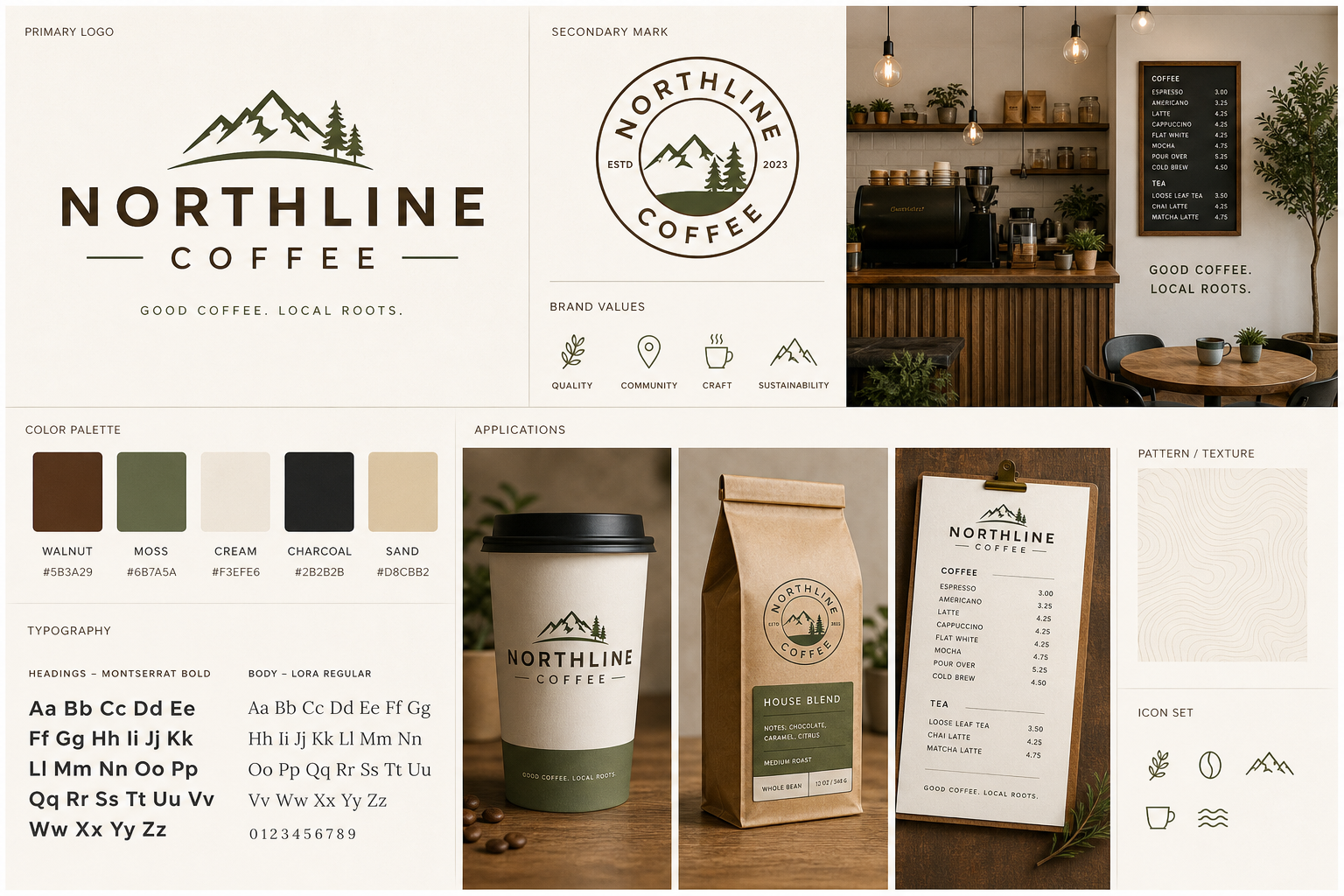
The reliable pattern is four parts — the business in one line → what the board must include → the palette and type direction → "cohesive, professional, real labels." Open https://image-2.net/:
Design a cohesive brand identity board on a single page for a small business.

Business: a neighborhood coffee shop called "Moss & Bean", warm and calm, sustainability-minded.
Include on the board: a primary logo mark and word mark, a small logo variant, a 5-color palette with hex swatches, two typefaces (heading and body) shown with sample text, a small pattern or texture, and 2-3 application mockups (cup, bag, card).
Style: modern minimal brand board, warm earthy palette (moss green, cream, terracotta), clean grid layout, tasteful and professional, real readable labels.
👉 Use this template: Remix the brand board
Reference templates: Coffee Shop Brand Board, Moss Radio Brand Identity Showcase, and Playful Brand Kit — Mochi Metro. Pick 16:9 and 2K so the swatches and labels stay legible.
Step 2 — Lock the exact palette
The board gives you a look — now make the colors exact and reusable:
- Download the brand board;
- Run it through the Color Palette Extractor to pull the precise hex codes;
- Save those hex values. Paste them into every later prompt (e.g. "moss green #4A5D3A, cream #F3EDE1, terracotta #C06B4E") so all your assets share the same exact colors.
This one step is what separates "a nice image" from "a brand." Fixed hex codes keep your social posts, packaging, and site visually identical.
Step 3 — Extend into every asset
With the palette locked, generate the rest of the system by reusing your brand keywords in each prompt.
Social cover / banner
Design a social media cover / brand banner that matches a warm earthy coffee-shop brand identity (moss green, cream, terracotta).

Content: the shop name "Moss & Bean" as a word mark, a short tagline, generous copy space on one side for text, a subtle coffee or leaf motif.
Style: cohesive with a minimal brand board, clean and warm, professional, legible type, uncluttered.
👉 Use this template: Remix the brand banner
Reference template: Banner — Coffee Brand with Copy Space.
More on-brand assets
- Podcast / show cover: see Podcast Cover Art — Studio Portrait;
- Packaging mockups: reuse your palette on a coffee bag or skincare packaging;
- Product hero shots: put your product on a clean white e-commerce background;
- Marketing posters and covers: for headline-driven graphics, see the marketing poster tutorial.
The trick throughout: repeat the same palette hex codes and style keywords in every prompt so the whole kit reads as one brand.
Step 4 — Export to the sizes each platform needs
Once every asset is generated, resize to spec:
- Use the Image Resizer to output platform sizes — Instagram 1080×1080, a story 1080×1920, a banner, a favicon;
- Use the Image Cropper to reframe a logo mark or crop the board into individual pieces.
Generate another, or use "Use as reference" for fixes
- Board feels off-brand? Click Generate another to reroll;
- Love the logo but not the palette? Click Use as reference and specify new colors;
- Want a dark variant of the board? Click Use as reference and add "provide a dark-background version of the same identity" to the prompt.
Tip: nail the brand board first and extract the palette before generating anything else. Every asset built on a fixed palette will match; assets generated ad hoc will drift.
Wrap-up
A small-business brand kit comes down to three things:
- On image-2.net, generate a cohesive brand board with logo, palette, and type;
- Extract the exact hex codes with the Color Palette Extractor and reuse them everywhere;
- Extend into social, packaging, and product assets, then resize per platform.
Save the board and your palette, and you can spin up new on-brand assets any time — in minutes, not days.